
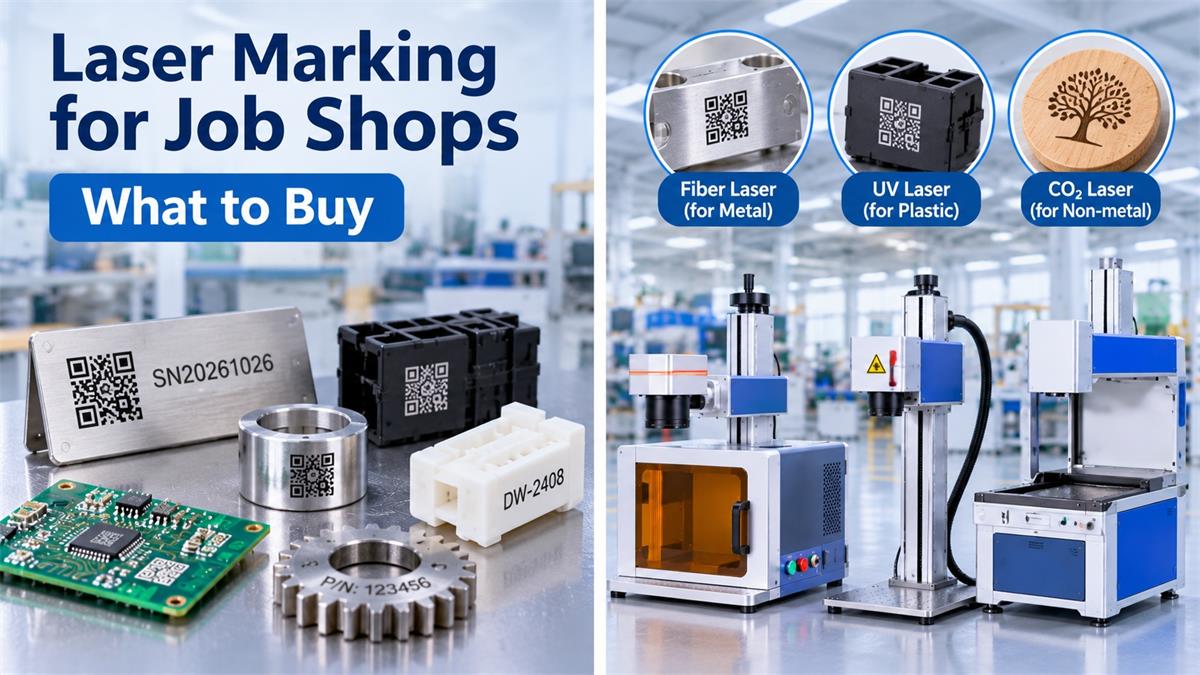
A job shop handles different customers, materials, and production requirements. One order may involve engraving serial numbers on stainless steel parts, while the next requires marking aluminum nameplates, plastic components, or customized products. This makes choosing a laser marking machine more complicated than purchasing equipment for a single manufacturing application.
For most job shops working primarily with metal components, a fiber laser marking machine is a practical starting point. It can handle common jobs involving stainless steel, aluminum, brass, copper, and other metals. However, businesses regularly processing plastics, wood, acrylic, or glass may need additional laser technologies.
Before purchasing equipment, it is worth comparing different configurations in the <a href=”https://www.dowinlaser.com/laser-marking-machine/” target=”_blank” rel=”noopener”>Dowin Laser Marking Machine Collection</a> and identifying which machine can handle the largest share of your actual customer orders.
This guide focuses on the equipment, configurations, and purchasing decisions that matter most to small and medium-sized laser marking job shops.
1. What Does a Typical Laser Marking Job Shop Need?
Unlike dedicated production facilities, job shops rarely process the same product throughout the day. Their business model usually depends on handling different customer orders with flexible production arrangements.
Typical jobs include:
-
Metal part identification and serial number engraving.
-
Company logos on stainless steel and aluminum products.
-
QR codes and Data Matrix marking.
-
Nameplates and equipment labels.
-
Customized metal gifts and promotional products.
-
Plastic component identification.
-
Wood, acrylic, leather, and other non-metal engraving.
This variety creates several equipment requirements.
Material flexibility: The machine should match the materials that generate most of your orders.
Easy setup: Changing between different products should not require complicated machine adjustments.
Suitable working area: The marking area must accommodate the dimensions of common customer parts.
Rotary capability: Cylindrical objects such as rings, bottles, and metal tubes may require a rotary attachment.
Consistent marking quality: Different orders may involve small text, logos, serial numbers, and detailed graphics.
For a new job shop, it is usually better to start with one well-matched machine rather than purchase several laser systems before understanding customer demand.
2. Which Laser Marking Machine Should a Job Shop Buy?
The first purchasing decision should be based on the materials you expect to process most frequently.
Fiber Laser Marking Machine: Best Starting Point for Metal Jobs
For job shops handling metal components, a fiber laser marking machine is generally the most practical first purchase.
It is commonly used for:
-
Stainless steel parts.
-
Aluminum components.
-
Brass and copper products.
-
Metal nameplates.
-
Tools and hardware.
-
Automotive components.
-
Serial numbers and identification codes.
Standard fiber laser markers commonly use a 1064nm wavelength.
For general surface marking, a 20W or 30W configuration can handle many everyday jobs. A 50W configuration is worth considering when customers require faster processing, more demanding engraving, or greater material removal.
However, if deep engraving is a major part of your business, you should evaluate higher-power configurations separately.
Why fiber is suitable for job shops: Metal marking covers a broad range of industrial and commercial applications. One fiber laser workstation can therefore serve different customers without requiring a completely different laser source for every metal product.
UV Laser Marking Machine: For Precision and Sensitive Materials
Some job shops receive orders involving small plastic components, electronic housings, PCB boards, and products where excessive heat can damage the surface.
In these situations, a UV laser marking machine may be a better choice.
Common applications include:
-
Electronic components.
-
Plastic housings and connectors.
-
PCB identification.
-
Precision QR codes.
-
Small product logos.
-
Heat-sensitive materials.
UV laser marking machines commonly operate at 355nm. Their short wavelength allows fine marking with reduced thermal effects on many suitable materials.
However, not every plastic responds equally well to UV laser processing. Material composition, color, additives, and surface coatings all influence the result.
Why consider UV: If your job shop regularly receives orders for precision plastic marking or electronic components, a UV machine can open up applications that may be difficult to handle consistently with a standard infrared fiber laser.
CO2 Laser Marking Machine: For Non-Metal Orders
A job shop serving advertising businesses, gift manufacturers, packaging companies, and craft producers may receive frequent orders involving non-metal materials.
A CO2 laser marking machine is suitable for many such applications.
Typical materials include:
-
Wood.
-
Leather.
-
Acrylic.
-
Paper and cardboard.
-
Rubber.
-
Textiles.
-
Certain plastics.
-
Glass, depending on the marking process.
CO2 laser marking machines generally use a 10.6μm wavelength.
They are particularly useful for businesses handling customized gifts, promotional products, decorative materials, and non-metal product identification.
Why consider CO2: If non-metal engraving accounts for a significant portion of your revenue, a dedicated CO2 marking system may provide better application coverage than trying to use a fiber laser for unsuitable materials.
3. Desktop, Portable, or Industrial: Which Machine Structure Is Better?
After selecting the laser type, the next decision is the machine structure.
Different job shops have different workspace limitations and product dimensions.
Desktop Enclosed Laser Marking Machine
A desktop enclosed machine is a good option for small workshops and businesses that mainly process small or medium-sized components.
Its advantages include:
-
Compact structure.
-
Enclosed working area.
-
Convenient operation.
-
Suitable for small metal parts and nameplates.
-
Additional physical protection through an enclosed design.
For example, the <a href=”https://www.dowinlaser.com/desktop-small-enclosure-model-fiber-laser-marking-machine-product/” target=”_blank” rel=”noopener”>Dowin DW-20FDE Desktop Fiber Laser Marking Machine</a> offers 20W standard power, with optional 30W and 50W configurations.
Its standard working area is 110 × 110mm, with optional 150 × 150mm and 175 × 175mm configurations.
This machine is particularly relevant for job shops processing small metal components, serial numbers, logos, and customized identification plates.
The enclosed structure is also useful when the workshop wants a more controlled marking workstation.
Portable Split Fiber Laser Marking Machine
Not every customer brings small components that fit conveniently inside an enclosed desktop machine.
Some orders involve larger workpieces, irregular metal parts, equipment housings, or components that are difficult to move.
A portable split machine provides more flexibility in these situations.
The <a href=”https://www.dowinlaser.com/portable-fiber-laser-marking-machine-product/” target=”_blank” rel=”noopener”>Dowin Portable Fiber Laser Marking Machine</a> features a separate laser marking head and control system.
Its advantages include:
-
A movable marking head.
-
Flexible positioning for different workpieces.
-
20W, 30W, and 50W configurations, depending on the selected model.
-
Optional rotary attachment.
-
110 × 110mm standard marking area, with larger options available.
This configuration is worth considering when a job shop frequently processes larger or irregularly shaped metal products.
It is important to understand that portable split machines are not necessarily more powerful or faster than desktop machines. Their main advantage is positioning flexibility.
Industrial Laser Marking System
If your business receives large recurring orders, production efficiency becomes increasingly important.
An industrial laser marking system may include:
-
Conveyor feeding.
-
Automatic positioning.
-
Product detection sensors.
-
PLC communication.
-
Vision positioning.
-
Automatic serial number generation.
However, not every job shop needs this level of automation.
For businesses processing different products in small batches, a flexible standalone workstation may provide better overall value.
4. What Laser Power Should a Job Shop Choose?
Laser power affects processing speed, engraving capability, and the types of jobs a machine can handle efficiently.
For fiber laser marking, the following configurations are common starting points:
| Laser Power | Typical Job Shop Applications |
|---|---|
| 20W | Logos, serial numbers, basic metal marking |
| 30W | General metal marking and moderate engraving |
| 50W | Faster processing and more demanding engraving |
| 60W | Deep engraving and industrial identification |
| 100W | Higher-efficiency deep engraving applications |
These are general selection guidelines rather than guaranteed performance levels.
For example, a 20W machine may produce excellent serial numbers on stainless steel but require considerably more time for deep engraving.
A 100W machine offers greater material removal capacity, but it may be unnecessary for a workshop that mainly processes logos and identification codes.
The correct power depends on:
-
Material type.
-
Required engraving depth.
-
Marking area.
-
Character dimensions.
-
Daily production quantity.
-
Acceptable processing time.
For a new job shop primarily handling standard metal marking, 30W or 50W fiber laser configurations are worth comparing.
If deep engraving is a regular paid service, evaluate a dedicated higher-power system instead of purchasing additional power without a clear application requirement.
5. Important Accessories Every Job Shop Should Consider
Accessories can significantly expand the range of orders a job shop can accept.
Before purchasing a machine, consider the following options.
Rotary Attachment
A rotary device allows cylindrical products to rotate during marking.
Typical applications include:
-
Metal rings.
-
Stainless steel bottles.
-
Cylindrical tubes.
-
Pens.
-
Metal handles.
-
Round components.
If customized cylindrical products are a regular part of your business, a rotary attachment is worth purchasing with the machine.
Larger Field Lens
A standard 110 × 110mm marking area is sufficient for many small components.
However, larger customer products may require a 150 × 150mm, 200 × 200mm, or larger marking area, depending on the machine configuration.
Remember that increasing the field size can affect spot size and marking quality. Test the required character size and detail before selecting a larger lens.
Z-Axis Lifting System
A motorized or manual Z-axis allows the marking head to accommodate products of different heights.
This is especially useful for job shops that frequently switch between thin metal plates, thicker components, and irregular workpieces.
Fixtures and Positioning Jigs
Custom fixtures help keep components in a consistent position during marking.
For repeated orders, a dedicated fixture can reduce setup time and improve marking consistency.
Fume Extraction
Laser marking can generate smoke, dust, and airborne particles depending on the material.
A suitable extraction and filtration system is important for maintaining a cleaner working environment, particularly when processing plastics, coatings, or other materials that generate fumes.
6. How Much Should a Job Shop Invest in Laser Marking Equipment?
The initial investment should reflect the services your business intends to offer.
Rather than choosing equipment based only on its purchase price, consider the potential revenue generated by each machine.
A practical purchasing strategy can be divided into three stages.
Stage 1: Starting a Metal Marking Business
Start with a 20W–50W fiber laser marking machine, depending on your customers’ marking requirements.
A desktop enclosed configuration is suitable for small components and limited workshop space. A portable split configuration is more appropriate when customers frequently bring larger workpieces.
Stage 2: Expanding Into Precision Marking
If you receive regular orders for electronic components, plastic housings, or delicate products, consider adding a UV laser marking machine.
This allows your business to accept more specialized jobs without relying on a single laser technology.
Stage 3: Expanding Non-Metal Services
If customers frequently request engraving on wood, leather, acrylic, and similar materials, consider adding a CO2 laser marking machine.
This approach allows you to expand equipment according to actual customer demand instead of purchasing every type of laser machine at the beginning.
7. Recommended Dowin Laser Machines for Different Job Shop Requirements
Based on the applications discussed above, these Dowin machines are worth evaluating for different job shop business models.
Option 1: DW-20FDE Desktop Fiber Laser Marking Machine
Product: <a href=”https://www.dowinlaser.com/desktop-small-enclosure-model-fiber-laser-marking-machine-product/” target=”_blank” rel=”noopener”>DW-20FDE Desktop Fiber Laser Marking Machine</a>
Best suited for: Small workshops and job shops primarily processing metal parts.
Relevant specifications:
-
Laser power: 20W, optional 30W and 50W.
-
Laser source: Raycus.
-
Wavelength: 1064nm.
-
Standard marking area: 110 × 110mm.
-
Optional marking areas: 150 × 150mm and 175 × 175mm.
-
Software: EZCAD.
-
Cooling: Air cooling.
Why recommend it?
The main advantage is its enclosed desktop structure combined with several available power configurations.
It is a sensible choice for businesses handling small metal components, identification plates, logos, and customized products.
It is not intended to replace a dedicated high-power deep engraving system or an automated production line.
Option 2: Dowin Portable Fiber Laser Marking Machine
Product: <a href=”https://www.dowinlaser.com/portable-fiber-laser-marking-machine-product/” target=”_blank” rel=”noopener”>Portable Fiber Laser Marking Machine</a>
Best suited for: Job shops processing larger or irregularly shaped metal components.
Relevant features:
-
Portable split design.
-
Movable marking head.
-
20W, 30W, and 50W configurations.
-
Optional rotary attachment.
-
Air-cooled operation.
-
Flexible positioning for different workpieces.
Why recommend it?
Unlike a fully enclosed desktop workstation, the split configuration allows the marking head to be positioned more flexibly.
This is particularly useful when customers bring metal components that cannot easily be placed inside a compact enclosure.
For job shops handling different product sizes, this flexibility can be more valuable than simply increasing laser power.
Option 3: Dowin UV Laser Marking Machine
Product: <a href=”https://www.dowinlaser.com/uv-laser-marking-machine/” target=”_blank” rel=”noopener”>Dowin UV Laser Marking Machine Collection</a>
Best suited for: Job shops handling electronic components, precision plastic marking, and heat-sensitive materials.
Why recommend it?
Its 355nm wavelength makes UV laser technology suitable for applications requiring fine marking and reduced thermal effects.
It is a more specialized investment and should be considered when there is sufficient demand for these applications.
Option 4: Dowin DW-30CO2 Laser Marking Machine
Product: <a href=”https://www.dowinlaser.com/co2-laser-marking-dw-30co2-product/” target=”_blank” rel=”noopener”>DW-30CO2 CO2 Laser Marking Machine</a>
Best suited for: Job shops processing wood, leather, acrylic, textiles, rubber, and other suitable non-metal materials.
Relevant specifications:
-
Laser power: 35W / 60W.
-
Laser source: Davi / CDR RF metal tube.
-
Wavelength: 10.64μm.
-
Standard marking area: 110 × 110mm, with 200 × 200mm option.
-
Marking speed: Up to 7,000mm/s.
Why recommend it?
Its RF CO2 laser configuration is designed for non-metal marking applications.
It is worth considering when customized gifts, promotional products, leather goods, and acrylic marking generate a meaningful share of your orders.
It should not be purchased as a replacement for a fiber laser when the main requirement is direct marking on metal.
For additional configurations, visit the <a href=”https://www.dowinlaser.com/laser-marking-machine/” target=”_blank” rel=”noopener”>Dowin Laser Marking Machine Collection</a>.
8. Five Mistakes to Avoid When Buying a Laser Marking Machine
Mistake 1: Buying the Highest-Power Machine Without Checking Demand
Higher power does not automatically mean better business performance.
If most orders involve small logos and serial numbers, a standard fiber laser may already meet your requirements.
Mistake 2: Ignoring Material Compatibility
A fiber laser cannot replace a CO2 laser for every non-metal material, and a standard fiber laser is not always the best option for delicate plastics.
Always test the actual materials before purchasing.
Mistake 3: Choosing a Working Area That Is Too Small
A small marking field may limit the types of customer products you can accept.
Consider the dimensions of your most common workpieces before selecting the lens.
Mistake 4: Forgetting About Fixtures and Accessories
A laser marking machine without suitable fixtures may take too much time to set up for different orders.
Rotary attachments, positioning jigs, and adjustable worktables can improve production flexibility.
Mistake 5: Buying Equipment Without Sample Testing
A machine specification sheet cannot guarantee the exact marking result on every material.
Before placing an order, send representative samples and request testing for:
-
Marking contrast.
-
Character clarity.
-
Required engraving depth.
-
Processing time.
-
Repeatability.
-
Surface damage.
For a job shop, the ability to handle real customer orders is more important than an impressive specification sheet.
9. Frequently Asked Questions
1. What is the best laser marking machine for a small job shop?
For a small job shop primarily processing metal components, a 20W–50W fiber laser marking machine is a practical starting point. A desktop enclosed model is suitable for small parts, while a portable split model offers more flexibility for larger workpieces.
2. Is a 20W fiber laser enough for a marking business?
Yes. A 20W fiber laser can handle many standard metal marking applications, including logos, serial numbers, and basic identification codes. However, businesses offering deep engraving or high-volume production may benefit from higher-power configurations.
3. Should a job shop buy fiber and UV laser machines together?
Not necessarily. If most orders involve metal parts, start with fiber laser equipment. Add a UV machine when customer demand for plastic, electronic, or heat-sensitive material marking justifies the additional investment.
4. Can one laser marking machine process both metal and plastic?
Some fiber lasers can mark certain plastics, but the results depend on the material formulation and surface properties. For fine marking on many heat-sensitive plastics, UV laser technology is often a better option. Sample testing is essential.
5. Is a portable or desktop laser marking machine better for a job shop?
A desktop enclosed machine is suitable for small parts, repeatable workstation operations, and businesses that prioritize an enclosed working area. A portable split machine is better when workpieces are larger, irregular, or difficult to position inside an enclosure.
6. What accessories should I buy with a fiber laser marking machine?
Consider a rotary attachment, suitable fixtures, a Z-axis lifting system, and a fume extraction unit. The exact accessories depend on your products and working environment.
7. Can a laser marking job shop handle customized orders?
Yes. Laser marking machines can process different logos, serial numbers, graphics, QR codes, and other variable content. With suitable fixtures and software, a job shop can switch between customer designs without changing the basic laser system.
Conclusion
For a job shop, purchasing a laser marking machine is a business decision, not simply an equipment selection exercise.
If metal marking represents most of your expected orders, start with a suitable fiber laser marking machine. Choose a desktop enclosed configuration for small components and a portable split configuration when workpiece flexibility is more important.
If your customer base includes electronic manufacturers or businesses requiring fine marking on heat-sensitive materials, UV technology is worth considering. For wood, leather, acrylic, and other non-metal orders, a CO2 marking machine can expand your service range.
The most practical strategy is to start with the machine that covers the largest share of your expected orders, test real customer materials, and expand your equipment as your business grows.
A well-matched machine can help a job shop accept more types of orders without investing in unnecessary equipment.
Post time: Nov-04-2026
