
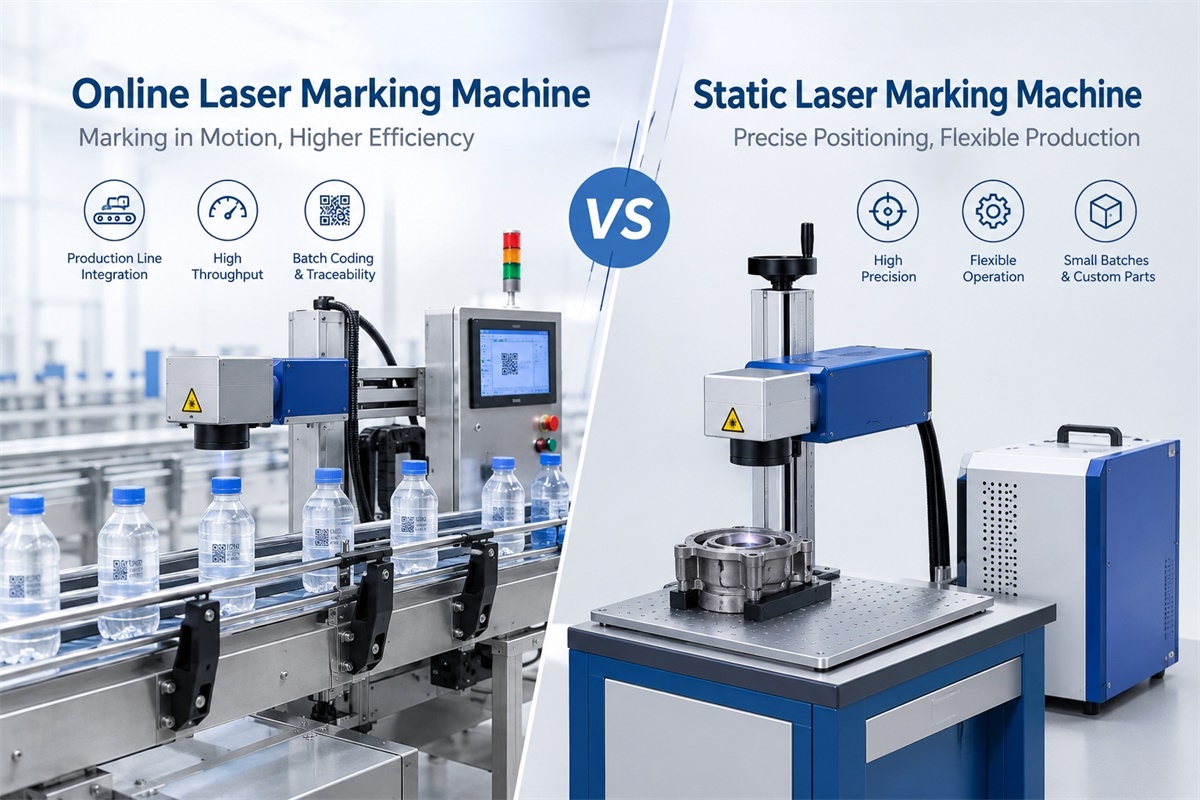
Choosing between an online laser marking machine and a static laser marking machine depends on how products move through your manufacturing process, how many parts you need to mark, and how the marking system will be integrated with existing equipment. A Dowin flying laser marking machine is designed for marking products in motion, while a static fiber laser marking machine is suitable for applications where products can be positioned at a fixed marking station. Understanding the difference helps manufacturers select the right equipment without paying for unnecessary automation or creating a production bottleneck.
What Is an Online Laser Marking Machine?
An online laser marking machine is integrated into a production line to mark products automatically as part of the manufacturing process.
Depending on the configuration, it can mark products while they are moving or when they pause briefly at a designated marking position. The system may include a laser source, scanning head, product sensor, encoder, controller, conveyor, and communication interfaces for integration with other production equipment.
Common applications include:
-
Printing production dates and batch numbers on packaging.
-
Marking QR codes and barcodes for product traceability.
-
Marking specifications on plastic pipes and cables.
-
Applying serial numbers to metal components.
-
Marking logos and identification information on products moving along an assembly line.
There are two common online marking approaches.
Flying laser marking: The laser marks products while they continue moving. This approach is useful for continuous production lines where stopping products would reduce throughput.
Stop-and-go online marking: Products move to a defined position and pause briefly while the laser completes the marking operation. The product then moves to the next production stage.
These approaches should not be confused. An online system does not necessarily mark products in continuous motion.
What Is a Static Laser Marking Machine?
A static laser marking machine marks a product while it remains stationary within the marking area.
The operator or an automated handling system places the workpiece on a platform, fixture, or positioning device. Once the product is correctly positioned, the laser marks the programmed content.
Static laser marking machines are widely used for marking metal parts, tools, electronic components, hardware, jewelry, and other products that require controlled positioning.
Typical applications include:
-
Serial numbers on metal components.
-
Logos on stainless steel and aluminum parts.
-
Product identification on electronic housings.
-
Marking tools, fittings, and mechanical components.
-
Small-batch production and customized marking jobs.
A static machine does not necessarily mean manual operation. Automatic loading, fixtures, rotary attachments, and robotic handling can be added. The defining feature is that the workpiece remains stationary during the actual marking process.
Online vs. Static Laser Marking Machine: Key Differences
| Comparison | Online laser marking machine | Static laser marking machine |
|---|---|---|
| Product movement | Moving or briefly stopped, depending on configuration | Stationary during marking |
| Production integration | Designed for production-line integration | Usually operates at a dedicated workstation |
| Loading method | Often automated or synchronized with a conveyor | Often manual or fixture-based |
| Best suited for | Repetitive, high-volume manufacturing | Batch production, individual parts, and flexible jobs |
| Marking synchronization | May require sensors, encoders, or PLC signals | Usually relies on product positioning and a marking trigger |
| Product changeover | Depends on line setup and automation | Often straightforward for different workpieces |
| Initial investment | Can be higher when conveyor and integration equipment are included | Often lower for a basic standalone setup |
| Main selection factor | Required production throughput and integration | Positioning needs and production flexibility |
Neither type is automatically better. The correct choice depends on the product, marking content, production volume, and required level of automation.
Which Machine Is Faster in Actual Production?
Online laser marking is often the better option when products must be marked continuously without interrupting an established production line. However, the words “online” and “static” alone do not determine the actual marking speed.
A static machine can mark a simple serial number very quickly, while an online system may require additional time to synchronize with product movement. Conversely, a static workstation that requires an operator to load and unload every part may become a bottleneck in high-volume manufacturing.
Consider a production line that handles 120 products per minute. A flying laser marking system must complete each mark within the available product interval, or the line may need a different configuration.
For static marking, the relevant measurement is the complete cycle time, including loading, positioning, marking, unloading, and any inspection process.
When comparing machines, evaluate:
-
Actual marking time for your content.
-
Product loading and unloading time.
-
Conveyor speed and product spacing.
-
Required marking contrast and depth.
-
Product positioning accuracy.
-
Changeover time between different products.
The most useful comparison is the number of acceptable, correctly marked products produced per hour, not just the laser scanner’s advertised speed.
Which Laser Source Should You Choose?
The choice between online and static marking is separate from the choice of laser source. Fiber, CO2, and UV lasers can be used in different marking configurations, depending on the application and equipment design.
Fiber Laser Marking Machine
Fiber lasers are widely used for marking compatible metal surfaces, including stainless steel, carbon steel, and aluminum.
They are suitable for industrial components, hardware, tools, and product identification applications.
For static marking, a fiber laser workstation can handle individual parts or batches. In online applications, a suitably configured fiber laser system can mark metal components as they move through production.
Explore Dowin’s fiber laser marking machine options to compare available equipment configurations.
CO2 Laser Marking Machine
CO2 laser marking is commonly used for compatible nonmetallic materials, including selected plastics, packaging materials, wood, and other organic materials.
For manufacturers marking bottles, pipes, cables, or packaging products, a CO2 flying laser marking machine may be suitable when the substrate responds appropriately to the laser.
See Dowin’s CO2 flying laser marking machine for a production-line application.
UV Laser Marking Machine
UV lasers are often considered for fine marking on selected plastics, electronic components, and other materials that benefit from a short-wavelength laser process.
They may be used in static workstations or integrated into automated marking systems.
The correct choice depends on the substrate, marking contrast, required detail, processing speed, and acceptable thermal effects. Sample testing is essential before choosing a configuration.
When Should You Choose an Online Laser Marking Machine?
An online system is generally worth considering when marking is a regular part of an automated manufacturing process.
1. Your Products Already Move Along a Conveyor
If products pass through a conveyor, packaging machine, or assembly line, integrating a laser marker into that process can reduce separate handling operations.
Depending on the application, the laser can mark products in motion or during a brief production-line pause.
2. You Need Consistent Batch Coding
Manufacturers that repeatedly mark production dates, lot numbers, serial numbers, or product codes may benefit from automated triggering and variable-data integration.
When connected to the appropriate controller or production system, the marking content can be updated without manually preparing every individual mark.
3. You Have High and Predictable Production Volumes
For large production runs with consistent product geometry and marking requirements, online marking can reduce repetitive operator involvement.
However, the system must be configured to handle the required line speed, product spacing, and marking complexity.
4. Stopping the Production Line Is Expensive
In continuous manufacturing, stopping products for marking can interfere with the overall process. Flying laser marking allows the marking operation to take place while products continue moving, provided the machine can meet the required performance specifications.
When Is a Static Laser Marking Machine the Better Choice?
A static machine is often more practical when production requires flexibility rather than continuous automated throughput.
1. You Mark Different Products in Small Batches
Manufacturers that frequently switch between product models may prefer a workstation where operators can change fixtures, adjust marking files, and reposition workpieces.
A static system can be a practical option for workshops and manufacturers handling mixed product orders.
2. Your Products Require Precise Positioning
Some components have complex geometries or specific marking locations. A dedicated fixture can help hold the workpiece in a repeatable position during marking.
For cylindrical components, a compatible rotary attachment may also be used to mark around the circumference.
3. You Need to Mark Large or Heavy Components
Large components may be difficult to feed through a conveyor. A static or portable laser marking setup can be more practical if the laser head can be positioned appropriately.
Dowin’s portable fiber laser marking machine is one option to evaluate when the workpiece is too large or inconvenient to move to a conventional marking station.
4. Your Production Volume Does Not Justify Full Integration
For small workshops or low-volume production, a standalone machine may provide the required marking quality without the additional expense of conveyor integration, sensors, and production-line controls.
The lower initial investment can be attractive when manual handling is not a significant operational problem.
Can a Static Laser Marking Machine Be Automated?
Yes. Static marking and automation are not mutually exclusive.
A static laser marking workstation can incorporate automatic loading, robotic handling, pneumatic fixtures, rotary attachments, or a programmable positioning stage.
For example, a robot can place a metal component into a fixture, the laser can mark the stationary part, and the robot can remove it when the cycle is complete.
This arrangement can provide repeatable positioning and reduce manual handling without requiring the laser to mark a continuously moving workpiece.
The important distinction is whether the product remains stationary during the laser marking process, not whether an operator is involved.
Online Laser Marking vs. Static Laser Marking: Total Cost
The initial machine price is only one part of the purchasing decision.
For an online system, the total investment may include:
-
Laser marking equipment.
-
Conveyor or mounting structure.
-
Sensors and encoder.
-
PLC and production-line communication.
-
Installation and commissioning.
-
Safety enclosure and protective devices.
-
Integration testing and ongoing maintenance.
For a static system, the main costs may include the marking machine, fixtures, rotary attachments, operator time, and any loading or positioning equipment.
A useful way to compare the options is to estimate the total cost per acceptable marked product:
Cost per marked product = Total operating cost ÷ Number of acceptable products marked
Include labor, consumables where applicable, maintenance, downtime, and rejected products. Also consider whether automation can eliminate a real bottleneck or simply adds complexity to a process that already works efficiently.
For high-volume production, online marking may offer operational advantages. For small batches and frequent product changes, static marking may deliver better overall value.
How to Choose the Right Machine for Your Factory
Before requesting a quotation, prepare the following information:
-
Material: Specify the exact metal, plastic, packaging, or other substrate.
-
Marking content: Provide sample text, logos, serial numbers, barcodes, or QR codes.
-
Production volume: State the number of products marked per hour or per shift.
-
Product movement: Confirm whether products move continuously, pause at a station, or are loaded manually.
-
Product dimensions: Provide the size, shape, and available marking surface.
-
Quality requirements: Define the required contrast, depth, readability, and positioning accuracy.
-
Automation requirements: Identify existing conveyors, sensors, PLCs, and variable-data systems.
-
Working environment: Consider available space, dust, fumes, product temperature, and safety requirements.
A supplier can use these details to recommend a suitable laser source, power level, marking field, and automation arrangement.
For production-line applications, test samples at the intended conveyor speed. For static applications, test representative parts using the proposed fixture and marking parameters.
This helps verify marking quality and throughput before you finalize the equipment specification.
Frequently Asked Questions
1. Is an online laser marking machine always faster than a static machine?
No. Online systems can improve throughput in automated production lines, but actual performance depends on marking content, line speed, product spacing, and synchronization. A static machine may be faster for simple marks or small batches.
2. Does an online laser marking machine always mark products while they move?
No. Online marking includes both flying marking and stop-and-go marking. Flying systems mark products in motion, while stop-and-go systems briefly pause products at the marking position.
3. Can a static laser marking machine be used on a production line?
Yes. A static marking station can be installed alongside a conveyor. Products stop at the station, receive their marks, and then continue through production.
4. Which machine is better for QR codes and serial numbers?
Both can mark QR codes and serial numbers. The decision depends on the required code size, readability, marking speed, product material, and production workflow.
5. Which option is more cost-effective for a small factory?
A basic static laser marking machine is often more economical when production volume is low and product handling is manageable. An online system may be more attractive when labor costs, repetitive handling, or production throughput justify integration.
6. Can the same laser source be used for online and static marking?
Some laser sources can be integrated into either type of system, but the complete configuration may differ. Online applications require suitable control and synchronization, while static systems focus on workpiece positioning and marking requirements.
7. How do I know whether my production line needs flying laser marking?
Check whether products must be marked without stopping, calculate the available marking time at your normal and maximum line speeds, and test the required content on actual products. If the system can maintain marking quality at the required throughput, flying marking may be suitable.
Final Recommendation
An online laser marking machine is generally the better choice for manufacturers seeking to integrate product identification into automated production, particularly when continuous movement and high throughput are important. A static laser marking machine is often more suitable for flexible production, small batches, customized parts, and applications requiring controlled workpiece positioning.
The decision should be based on the entire manufacturing process rather than machine type alone.
If you are comparing options for your factory, explore Dowin’s laser marking machines and review the CO2 flying laser marking machine for production-line applications. Provide your material, marking content, production volume, and handling requirements to identify the most suitable configuration.
Post time: Oct-28-2026
