
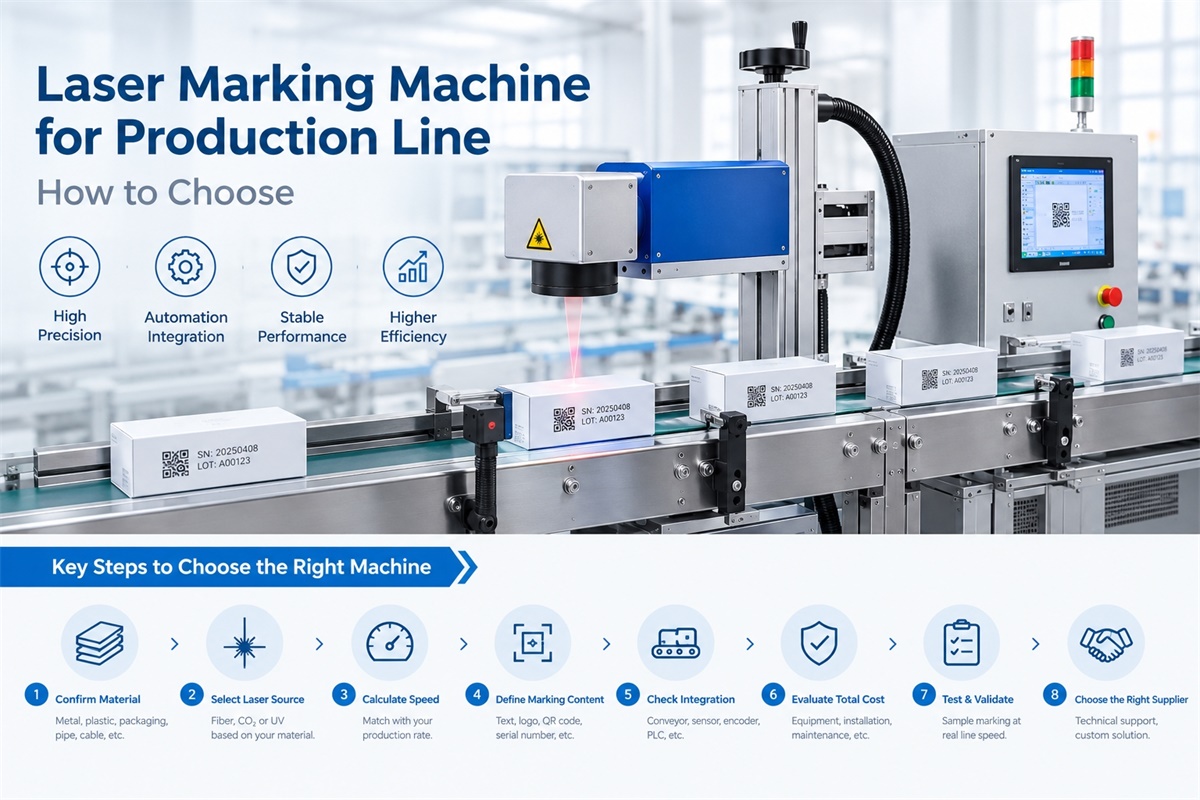
Choosing a laser marking machine for a production line requires more than comparing laser power or advertised marking speed. The right system must match your product material, conveyor speed, marking content, and automation requirements. Dowin offers laser marking machines for different materials and applications, including fiber, CO2, and UV laser systems, as well as specialized flying laser marking solutions for wire and cable production. This guide explains how to select a suitable industrial laser marking machine based on real production requirements, helping manufacturers avoid unnecessary investment and improve marking consistency.
1. Determine Whether You Need Flying or Stop-and-Go Marking
The first decision is how products will move through the marking station.
A laser marking machine for a production line generally operates in one of two ways: flying marking or stop-and-go marking.
Flying Laser Marking Machine
A flying laser marking machine marks products while they continue moving along a conveyor or production line.
The system typically uses a product sensor, marking controller, and, when required, an encoder to synchronize the marking process with product movement.
Flying marking is particularly suitable for:
-
Plastic pipes and cables.
-
Bottles and packaging.
-
Continuous production processes.
-
Products requiring batch numbers or production dates.
-
High-volume manufacturing where stopping products would reduce throughput.
For example, a pipe manufacturer may need to print specifications, manufacturer identification, and production codes at regular intervals along a continuously moving pipe. A flying laser marking system can perform this task without requiring each section to stop.
See Dowin’s CO2 flying laser marking machine for an example of production-line marking equipment.
Stop-and-Go Laser Marking Machine
A stop-and-go system moves products to a designated marking position and pauses them while the laser completes the mark.
This configuration is useful when products need accurate positioning or when the marking cycle is too long for continuous flying operation.
Typical applications include:
-
Metal components on an indexed assembly line.
-
Parts requiring a fixed marking position.
-
Products with complex identification content.
-
Production lines that already use intermittent movement.
A stop-and-go system may be simpler to integrate when the existing production line already pauses products at each workstation.
Practical recommendation: Choose flying marking when uninterrupted product movement is a priority. Choose stop-and-go marking when controlled positioning and the available marking time make it more practical.
2. Choose the Laser Source According to the Material
The laser source is one of the most important selection decisions because different wavelengths interact differently with different materials.
A machine that produces excellent results on stainless steel may not deliver the same result on a plastic bottle or electronic component.
Fiber Laser Marking Machine for Metal Products
Fiber laser marking machines are widely used for industrial metal marking.
Suitable applications may include:
-
Stainless steel and carbon steel components.
-
Aluminum parts and anodized aluminum.
-
Metal fittings and hardware.
-
Machinery components and tools.
-
Serial numbers, logos, and traceability codes.
Fiber lasers are common in automotive parts manufacturing, machinery production, hardware processing, and metal component identification.
For production-line applications, the system must also provide suitable triggering and synchronization capabilities.
Explore Dowin’s fiber laser marking machine range to review available configurations.
CO2 Laser Marking Machine for Nonmetal Materials
CO2 laser marking machines are commonly used for compatible nonmetallic materials.
Typical applications include:
-
Selected plastic packaging.
-
Plastic pipes and cable materials.
-
Wood and other organic materials.
-
Packaging products requiring identification.
-
Other substrates compatible with the CO2 wavelength.
The actual marking result depends on the material formulation, additives, surface finish, and required contrast.
For example, some plastic materials respond well to CO2 marking, while others may require a different wavelength to achieve sufficient contrast or avoid unwanted surface damage.
Dowin’s CO2 flying laser marking machine is worth evaluating for suitable packaging and continuous production applications.
UV Laser Marking Machine for Fine or Heat-Sensitive Applications
UV laser marking is often considered for applications requiring fine details or reduced thermal impact on suitable materials.
Potential applications include:
-
Selected plastic components.
-
Electronic parts.
-
Fine product identification.
-
Certain packaging and precision marking applications.
UV marking is not automatically suitable for every plastic or heat-sensitive product. Sample testing is necessary to confirm marking quality, readability, and material compatibility.
You can compare Dowin’s UV laser marking machines with its fiber and CO2 options when evaluating your material requirements.
3. Calculate the Required Production Speed
One of the most common mistakes when choosing a production-line laser marker is selecting a machine based only on its advertised scanning speed.
A laser scanner’s speed, usually expressed in millimeters per second, does not directly indicate how many products the complete system can mark per minute.
Actual throughput depends on:
-
Conveyor speed.
-
Distance between products.
-
Marking content and size.
-
Required marking contrast or depth.
-
Laser source and scanner performance.
-
Triggering and synchronization.
-
Product positioning and stability.
Calculate the Product Arrival Rate
For a conveyor operating at a constant speed:
Product arrival rate = Conveyor speed ÷ Product spacing
Make sure both measurements use the same units.
For example, suppose a conveyor runs at 30 meters per minute and products are spaced 100 mm apart.
The conveyor speed is 500 mm per second.
The theoretical arrival rate is:
500 mm/s ÷ 100 mm = 5 products per second.
This equals 300 products per minute.
However, this does not mean a laser marking machine can necessarily mark 300 products per minute. It must complete the required marking within the available interval while maintaining acceptable quality.
For a stop-and-go system, calculate the complete cycle time, including product positioning, marking, and any required movement between products.
Before purchasing a machine, ask the supplier to test your actual marking content at the required production speed.
4. Select the Correct Marking Content and Field Size
The marking content has a direct effect on production performance.
A short production date generally requires less marking time than a large logo, a detailed graphic, or a complex QR code.
Before selecting a machine, prepare examples of the content you intend to mark.
| Marking requirement | Important considerations |
|---|---|
| Production date | Character size, readability, and available marking time |
| Batch or lot number | Variable-data input and automatic updates |
| Serial number | Unique data generation and traceability |
| QR code | Code dimensions, contrast, and reader compatibility |
| Barcode | Module size, line quality, and scanning reliability |
| Logo | Graphic complexity and required marking area |
| Deep marking | Required depth, material, and processing time |
The marking field must also match the product geometry.
A large marking field can accommodate larger content or more positioning flexibility, but it does not automatically provide a faster production rate. The final choice depends on the required content, optics, working distance, and system configuration.
For cylindrical or irregularly shaped products, additional fixtures, rotary attachments, or specialized optics may be required.
5. Check Whether the Machine Can Integrate With Your Existing Production Line
A production-line laser marking machine must work with the equipment already installed in your factory.
Depending on the application, the integration may include:
-
Conveyor or production-line mounting.
-
Photoelectric product detection.
-
Encoder feedback for flying marking.
-
PLC communication.
-
Variable-data input.
-
Product tracking and inspection.
-
Safety interlocks and protective enclosures.
Sensor and Trigger Configuration
The sensor detects when a product reaches a specific position and triggers the marking sequence.
Its location must account for product dimensions, conveyor speed, and the distance between the detection point and the laser marking position.
Incorrect triggering can cause the mark to appear too early, too late, or in the wrong location.
Encoder and Speed Synchronization
An encoder is commonly used in flying marking applications to track conveyor movement.
When the conveyor speed changes, the control system uses the encoder feedback to coordinate marking with product movement, within the system’s operating limits.
If the production line operates at variable speeds, confirm that the proposed system can maintain the required marking quality during acceleration and deceleration.
PLC and Variable-Data Integration
If each product needs a different serial number, production date, or batch code, determine how the laser controller will receive the data.
The machine may need to communicate with a PLC, computer, production management system, or another data source.
Before installation, define how the system should respond to missing data, communication failures, incorrect product detection, and marking errors.
For more information about production-line synchronization, review Dowin’s wire and cable laser marking solutions.
6. Evaluate Marking Quality on the Actual Product
A machine that performs well on a demonstration sample may produce different results on your actual production materials.
Differences in surface finish, color, coating, additives, and material composition can affect marking quality.
Before finalizing the machine specification, test representative samples from your production process.
Evaluate the following:
-
Marking contrast.
-
Character clarity.
-
QR-code or barcode readability.
-
Marking position and consistency.
-
Required marking depth.
-
Surface damage or discoloration.
-
Performance at the intended line speed.
For QR codes and barcodes, use the type of reader expected in your production environment. A code that looks clear to the naked eye may not always scan reliably.
If the product material varies between batches, test more than one representative sample where practical.
7. Consider Total Operating Cost, Not Just the Machine Price
A production-line laser marking system may involve more than the cost of the laser source and marking head.
Depending on the configuration, the complete investment may include:
-
Laser marking equipment.
-
Conveyor or mounting modifications.
-
Sensors and encoder.
-
PLC and software integration.
-
Safety enclosure and fume extraction.
-
Installation and commissioning.
-
Operator training and maintenance.
A lower-cost machine may be suitable for a simple application, but it could require additional engineering if it cannot integrate directly with the existing production line.
A more advanced system may cost more initially but reduce repetitive manual handling or eliminate a production bottleneck.
To compare options fairly, estimate the total operating cost per acceptable marked product:
Cost per marked product = Total operating cost ÷ Number of acceptable marked products
Include labor, maintenance, consumables where applicable, downtime, and rejected products.
The best investment is the configuration that meets your production requirements at an acceptable total cost, not necessarily the machine with the lowest initial price.
8. Common Mistakes When Choosing a Production-Line Laser Marker
Choosing the Laser Before Testing the Material
Different materials respond differently to fiber, CO2, and UV lasers.
Better approach: Test the actual product material before committing to a laser source.
Focusing Only on Advertised Marking Speed
A high scanning speed does not guarantee the required number of marked products per minute.
Better approach: Test the full system at your intended conveyor speed and with your actual marking content.
Ignoring Product Spacing
Even a fast marking system may struggle if products arrive too close together.
Better approach: Calculate the product arrival rate and confirm that the system can complete each mark within the available time.
Overlooking Automation Requirements
A machine may produce good marks but still be unsuitable for a production line if its triggering, data input, or PLC interfaces are incompatible.
Better approach: Confirm all required signals and communication methods before ordering.
Skipping Production-Speed Testing
Stationary sample testing alone cannot prove that a flying marking system will perform reliably on a moving production line.
Better approach: Conduct a realistic trial using the intended product, marking content, and operating speed.
9. A Practical Checklist for Selecting Your Machine
Use the following checklist when preparing a quotation request.
-
Exact product material and surface finish.
-
Product dimensions and marking position.
-
Sample marking content.
-
Normal and maximum conveyor speed.
-
Product spacing and required throughput.
-
Required marking contrast, depth, and readability.
-
Flying or stop-and-go operation.
-
Sensor, encoder, and PLC requirements.
-
Variable-data and traceability requirements.
-
Available installation space.
-
Safety and fume extraction requirements.
-
Sample testing and commissioning expectations.
The more complete the information, the easier it is for a supplier to recommend an appropriate configuration and provide a realistic performance estimate.
Frequently Asked Questions
1. Which laser marking machine is best for a production line?
The best machine depends on the product material, marking content, conveyor speed, and automation requirements. Fiber lasers are widely used for metals, CO2 lasers for suitable nonmetallic materials, and UV lasers for selected fine-marking applications. The complete system must also meet the required production rate.
2. Is a flying laser marking machine necessary for automated production?
No. An automated production line can use flying marking or stop-and-go marking. Flying marking is useful when products must continue moving, while stop-and-go marking may be more suitable when accurate positioning or longer marking cycles are required.
3. How do I calculate the required marking speed?
Calculate the product arrival rate using conveyor speed and product spacing. Then verify that the laser can complete the required marking within the available time. Confirm the result through production-speed testing rather than relying only on the scanner’s advertised speed.
4. Can one laser marking machine mark both metal and plastic?
Some laser systems can mark multiple materials, but performance varies significantly with material composition and surface treatment. A fiber laser suitable for metal marking may not produce the desired result on every plastic. Sample testing is essential when multiple materials are involved.
5. Can a laser marking machine print different serial numbers automatically?
Yes, provided the controller and software support variable-data input. The system must be configured to receive the correct information from the appropriate data source and associate it with the correct product.
6. Does an in-line laser marking machine require a conveyor?
Not always. Some systems integrate directly with an existing conveyor, while others operate with robotic handling, automated assembly equipment, or indexed production systems. The machine should be configured around the actual manufacturing process.
7. What information should I send a supplier before requesting a quotation?
Provide the material, product dimensions, marking content, required production speed, product spacing, marking-quality requirements, and existing automation interfaces. Representative samples are especially useful for determining laser compatibility and achievable marking performance.
Conclusion
Choosing a laser marking machine for a production line requires a complete evaluation of the product, marking process, and production environment.
Start by determining whether you need flying or stop-and-go marking. Then select the appropriate laser source, calculate the required throughput, verify the marking field, and confirm compatibility with the existing conveyor and control system.
Most importantly, test the actual material and marking content at the intended production speed before finalizing the machine specification.
If you are planning a new production-line marking project, explore Dowin’s laser marking machine range and wire and cable marking solutions. Prepare your product samples and production requirements to help identify a suitable system for your application.
Post time: Oct-28-2026
