
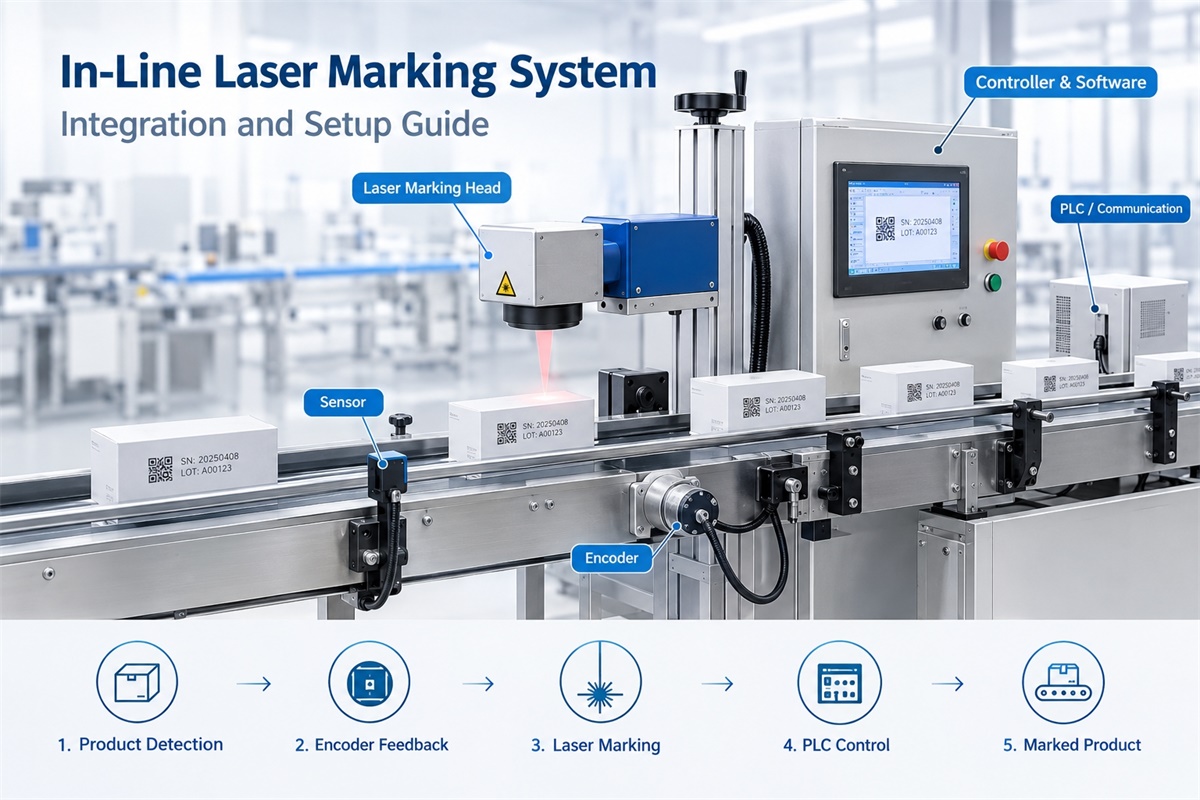
An in-line laser marking system allows manufacturers to mark products directly within an existing production line, reducing manual handling and helping maintain consistent product identification. Whether you need to print batch numbers on plastic pipes, mark QR codes on metal components, or apply production dates to packaging, the system must be matched to your material, conveyor speed, and automation requirements. Dowin provides custom laser marking solutions that can include material testing, laser selection, and customized conveyor equipment. The following guide explains how to plan, install, and commission an in-line laser marking system for industrial production.
What Is an In-Line Laser Marking System?
An in-line laser marking system is an industrial marking solution integrated into a manufacturing or packaging line. Instead of transferring products to a separate workstation for marking, the system applies identification directly within the production process.
A typical system includes:
-
Laser source: Generates the laser beam for marking the product.
-
Galvanometer scanning head: Directs the beam to create text, graphics, codes, and other marking content.
-
Marking controller and software: Manages the marking parameters and coordinates system operation.
-
Photoelectric sensor: Detects the arrival of a product at the marking station.
-
Encoder: Measures conveyor movement when speed synchronization is required.
-
Conveyor or production-line interface: Positions or transports products through the marking area.
-
PLC or communication interface: Coordinates marking with other production equipment when required.
-
Protective equipment: Provides the enclosure, interlocks, and other safety measures appropriate to the installation.
The configuration depends on the production process. A simple system may use a sensor to trigger marking when a product arrives. A more advanced installation may include encoder feedback, variable-data communication, automatic rejection of defective products, and integration with a production management system.
How Does an In-Line Laser Marking System Work?
Most in-line laser marking applications follow a similar operating sequence, although the exact control logic depends on the machine configuration.
Step 1: Products Enter the Marking Area
Products arrive at the marking station through a conveyor, automated handling system, or another production-line mechanism.
The products must be positioned consistently enough for the laser to mark the intended area. Guides, fixtures, or positioning devices may be necessary if products move, rotate, or vary in orientation.
Step 2: The Sensor Detects the Product
A photoelectric sensor detects the product and sends a trigger signal to the marking controller or PLC.
The sensor position determines when the marking sequence begins. Its location must account for the product dimensions, conveyor speed, and distance to the laser marking position.
Poor trigger positioning can result in marks appearing too early, too late, or outside the intended marking area.
Step 3: The Controller Coordinates the Marking Process
The controller receives the trigger signal and executes the configured marking program.
For a stop-and-go system, the product is positioned and held stationary while marking takes place.
For a flying laser marking system, the controller coordinates the scanning process with product movement. An encoder may provide feedback about conveyor travel so that the marking can be synchronized with the moving product.
See Dowin’s CO2 flying laser marking machine for an example of laser marking equipment designed for production-line applications.
Step 4: The Laser Applies the Mark
The laser marks the programmed information onto the product surface.
Depending on the material and configuration, the content may include:
-
Production dates and expiration dates.
-
Batch and lot numbers.
-
Serial numbers.
-
QR codes and barcodes.
-
Company logos and product identification.
-
Specifications and traceability information.
The marking result depends on the laser source, power, marking speed, material characteristics, surface condition, and required contrast or depth.
Step 5: The Product Continues Through Production
After marking is completed, the product proceeds to the next production stage.
For applications requiring traceability, the system may also communicate marking status or product information to a PLC or other control system. Additional inspection equipment can be used to verify code readability where required.
Online, In-Line, and Flying Laser Marking: What Is the Difference?
These terms are closely related, but they do not always describe exactly the same configuration.
| Term | Typical meaning |
|---|---|
| In-line laser marking system | A laser marking system integrated into a production line |
| Online laser marking machine | A marking machine operating as part of an ongoing manufacturing process |
| Flying laser marking machine | A system that marks products while they are moving |
| Stop-and-go marking system | A system that pauses products at a defined marking position |
An in-line system may use either flying marking or stop-and-go marking.
Flying marking is particularly useful when stopping the conveyor would reduce production throughput. Stop-and-go marking may be preferable when products require precise positioning, marking cycles are longer, or the production line already uses indexed movement.
The appropriate configuration depends on the available marking time, product geometry, and required production rate.
Step-by-Step Guide to Integrating an In-Line Laser Marking System
Successful integration starts with the production requirements, not with the laser machine alone.
Step 1: Define the Product and Marking Requirements
Before selecting equipment, identify exactly what needs to be marked.
Record the following information:
-
Product material and surface finish.
-
Product dimensions and shape.
-
Marking position and orientation.
-
Text, logo, barcode, or QR code requirements.
-
Required marking contrast and depth.
-
Expected production volume.
-
Normal and maximum conveyor speed.
These details help determine the appropriate laser source, marking field, mounting arrangement, and control method.
For example, a manufacturer marking short date codes on plastic packaging has different requirements from a manufacturer applying deep serial numbers to metal components.
Step 2: Select the Appropriate Laser Source
Laser selection should be based primarily on the material and required marking result.
Fiber laser: Commonly used for compatible metal surfaces, including stainless steel, carbon steel, and aluminum. It is widely considered for industrial component identification and traceability.
CO2 laser: Commonly used for suitable nonmetallic materials, including selected plastics, packaging materials, and other compatible substrates.
UV laser: Often considered for fine marking on selected plastics, electronic components, and materials where reduced thermal impact is desirable.
Not every plastic or coated material responds the same way to a particular laser wavelength. Testing representative samples is important before confirming the final configuration.
For an industrial fiber laser application, review Dowin’s fiber laser marking equipment. For packaging and other suitable nonmetallic materials, consider the CO2 flying laser marking machine.
Step 3: Determine Whether the Product Should Stop or Keep Moving
This decision affects the entire integration design.
Choose flying marking when:
-
Products move continuously along the line.
-
Stopping products would interfere with throughput.
-
The marking content can be completed within the available marking time.
-
Product movement can be tracked accurately enough for the required result.
Choose stop-and-go marking when:
-
Products need a fixed position during marking.
-
The marking content requires a longer cycle.
-
The production line already uses an indexed conveyor.
-
Positioning and repeatability are more important than continuous movement.
Do not assume that flying marking is automatically faster. The system must be tested at the actual production speed with the intended marking content.
Step 4: Plan the Mechanical Installation
Determine where the laser head, controller, sensor, and any additional equipment will be installed.
Check:
-
The available mounting space.
-
The distance between the laser head and the product surface.
-
The required marking field.
-
Conveyor height and product clearance.
-
Product movement and orientation.
-
Access for maintenance and cleaning.
-
Cable routing and protection.
-
The space required for protective enclosures and fume extraction.
The mounting structure must remain stable during operation. Excessive vibration or movement can affect marking position and consistency.
If the conveyor or product handling mechanism needs modification, settle the mechanical design before final installation.
Step 5: Install the Sensor and Encoder
The sensor detects product arrival, while an encoder can provide information about conveyor movement.
For a basic stop-and-go system, product detection and reliable positioning may be sufficient.
For flying marking, encoder feedback is commonly used when conveyor movement must be tracked. The encoder should be mechanically coupled and configured so that its signals accurately represent actual product movement.
During setup:
-
Confirm that the sensor reliably detects the intended product.
-
Verify the distance between the detection point and the marking position.
-
Check encoder direction and calibration.
-
Confirm that the controller receives stable signals.
-
Test the system at different conveyor speeds.
If the encoder measures motor movement rather than actual conveyor travel, belt slip or mechanical transmission errors may affect synchronization. The installation should account for these potential differences.
Step 6: Configure the Marking Software
Set up the marking file and operating parameters according to the product requirements.
Common settings include:
-
Marking content and font.
-
Character size and spacing.
-
Marking position.
-
Laser power and marking speed.
-
Pulse frequency or other laser-specific parameters.
-
Trigger mode.
-
Flying marking or motion compensation settings, when supported.
-
Variable-data fields for dates, serial numbers, and batch codes.
The available parameters depend on the laser source and controller.
Begin with a suitable sample-marking program, then adjust the settings based on the actual marking result. Avoid relying exclusively on default settings because different materials and production speeds may require different parameters.
Step 7: Integrate the PLC and Production-Line Controls
Some installations can operate through a dedicated marking controller and sensor. Others require communication with a PLC or broader automation system.
Typical integration functions include:
-
Product-arrival signals.
-
Marking-start commands.
-
Marking-complete signals.
-
Fault and alarm outputs.
-
Conveyor start or stop coordination.
-
Variable-data transfer.
-
Product tracking and rejection signals.
Before commissioning, define the expected behavior for normal operation, missing products, marking failures, communication interruptions, and emergency stops.
The exact signal types and communication protocols must be confirmed with the equipment supplier and the existing production-line controls.
Step 8: Install Appropriate Safety Measures
Laser marking systems must be assessed as part of the complete installation.
Depending on the laser class and operating environment, safety provisions may include:
-
A suitable laser enclosure.
-
Interlocked access panels.
-
Beam shielding and controlled access.
-
Warning indicators and labels.
-
Emergency-stop integration where required.
-
Fume extraction for marking processes that generate fumes or particles.
-
Appropriate electrical and mechanical protection.
The final installation should meet the applicable laser safety requirements in the country where the equipment will operate. Do not bypass safety interlocks to improve production speed.
How to Calculate the Required Marking Speed
One of the most important integration checks is whether the marking system can complete each mark within the available production time.
For a conveyor running at a constant speed, the approximate time between products is:
Time between products = Product spacing ÷ Conveyor speed
Use consistent units for both measurements.
For example, suppose a production line operates at 30 meters per minute, with 100 mm between consecutive products.
The conveyor speed is 500 mm per second, so the time between products is:
100 mm ÷ 500 mm/s = 0.2 seconds.
This corresponds to a theoretical arrival rate of five products per second, or 300 products per minute.
However, this is the product arrival rate, not a guarantee that the marking system can process 300 products per minute.
The actual system must also account for marking complexity, trigger timing, product variation, available marking field, and controller performance. A representative production test is necessary to confirm the achievable rate.
Common Integration Problems and How to Solve Them
1. Marking Position Shifts Between Products
Possible causes: Incorrect sensor placement, unstable product positioning, encoder calibration errors, or inadequate motion synchronization.
Recommended checks: Verify the detection point, encoder feedback, product spacing, and mechanical stability. Test the system at different conveyor speeds.
2. Marking Is Incomplete at High Speed
Possible causes: Insufficient marking time, complex graphics, unsuitable laser parameters, or scanner and controller limitations.
Recommended checks: Test the actual marking content at the required production speed. Evaluate whether the content, laser configuration, or production-line arrangement needs adjustment.
Increasing laser power alone may not solve a timing or synchronization problem.
3. Product Codes Are Difficult to Read
Possible causes: Insufficient contrast, unsuitable code dimensions, material variation, or inconsistent product positioning.
Recommended checks: Verify the code size, marking parameters, and surface compatibility. Use the intended barcode or QR-code reader to validate the finished marks.
4. The Sensor Misses Products
Possible causes: Unsuitable sensor selection, incorrect alignment, reflective surfaces, inconsistent product spacing, or unstable signals.
Recommended checks: Verify the sensor’s operating range and detection method with actual products. Check its alignment and the controller’s trigger response.
5. The System Does Not Communicate Correctly With the PLC
Possible causes: Incorrect signal mapping, incompatible interfaces, timing problems, or communication settings.
Recommended checks: Confirm the I/O configuration, signal logic, communication settings, and fault-handling sequence with the equipment supplier and automation engineer.
6. Smoke or Residue Affects Production
Possible causes: The marked material generates fumes or particles, or the extraction system is inadequate.
Recommended checks: Evaluate the material and marking process, then install suitable extraction and filtration where necessary. The extraction method must match the contaminants generated by the actual process.
Commissioning Checklist Before Mass Production
Before releasing the in-line laser marking system for regular production, verify the following items.
-
Laser source and marking parameters match the product material.
-
Product detection works reliably.
-
Encoder direction and calibration are correct, if used.
-
Marking position remains consistent at normal operating speed.
-
The system performs at the required maximum line speed.
-
Variable data updates correctly, if required.
-
Barcodes and QR codes pass the intended readability checks.
-
PLC signals and fault responses operate correctly.
-
Protective enclosures, interlocks, and other safety measures are functional.
-
Operators understand the startup, shutdown, and basic troubleshooting procedures.
-
Maintenance and cleaning procedures are documented.
A successful commissioning test should use representative production materials and realistic operating conditions rather than relying only on stationary samples.
How to Choose a Supplier for an In-Line Laser Marking System
A suitable supplier should understand both laser marking and production-line integration.
When comparing suppliers, ask whether they can:
-
Recommend the appropriate laser wavelength for your material.
-
Test samples before finalizing the configuration.
-
Match the system to your actual conveyor speed.
-
Supply suitable sensors, encoder interfaces, and mounting arrangements.
-
Support PLC integration when required.
-
Provide installation guidance, operating instructions, and technical support.
-
Explain the expected marking performance and its limitations.
Dowin’s custom laser marking solution service describes sample testing, laser selection, and customized conveyor equipment. These are useful points to discuss when specifying an automated marking project.
Before requesting a quotation, prepare product samples, marking files, product dimensions, conveyor speed, product spacing, and any existing PLC or control-system requirements.
Frequently Asked Questions
1. Can an in-line laser marking system work with an existing conveyor?
Yes. Many systems can be integrated with existing conveyors, provided the mechanical installation, product positioning, triggering, and marking speed are suitable. Additional mounting structures, sensors, encoder feedback, or control interfaces may be required.
2. Does every in-line laser marking system need an encoder?
No. A stop-and-go system may operate using product detection and positioning without requiring conveyor-speed feedback. An encoder is commonly used when flying marking needs to synchronize the laser process with product movement.
3. Which laser is best for in-line marking?
Fiber lasers are widely used for metals, CO2 lasers for suitable nonmetallic materials, and UV lasers for selected plastics and fine-marking applications. The correct choice depends on the actual substrate and the required marking result.
4. Can the system mark different serial numbers on consecutive products?
Yes, if the controller and software support variable-data input. The source of the data, update timing, and communication method must be configured and tested as part of the integration.
5. How much space does an in-line laser marking system require?
The space requirement depends on the laser head, working distance, marking field, mounting structure, controller cabinet, conveyor layout, and safety enclosure. The installation should be designed around the complete system rather than the laser head alone.
6. How can I verify marking quality before installation?
Send representative samples to the supplier for testing. Evaluate contrast, readability, marking depth where applicable, material effects, and marking time. For flying applications, request testing at the intended conveyor speed whenever possible.
7. Can an in-line laser marking system operate continuously?
It can be designed for continuous production, but the complete system must support the required operating schedule, marking rate, thermal conditions, maintenance intervals, and safety arrangements. Continuous operation should be validated against the equipment specifications.
Conclusion
An in-line laser marking system can improve production efficiency by bringing product identification directly into the manufacturing process. However, reliable performance requires more than selecting a laser with sufficient power. The laser source, sensor, encoder, scanning head, software, conveyor, and production-line controls must work together.
Start with the material, marking content, product spacing, and actual production speed. Then select the appropriate laser configuration, plan the mechanical and electrical integration, and validate the complete system under realistic operating conditions.
If you are planning an automated marking project, explore Dowin’s laser marking equipment and customized laser marking solutions. Providing your production requirements and representative samples will help establish a more accurate machine configuration.
Post time: Oct-28-2026
