
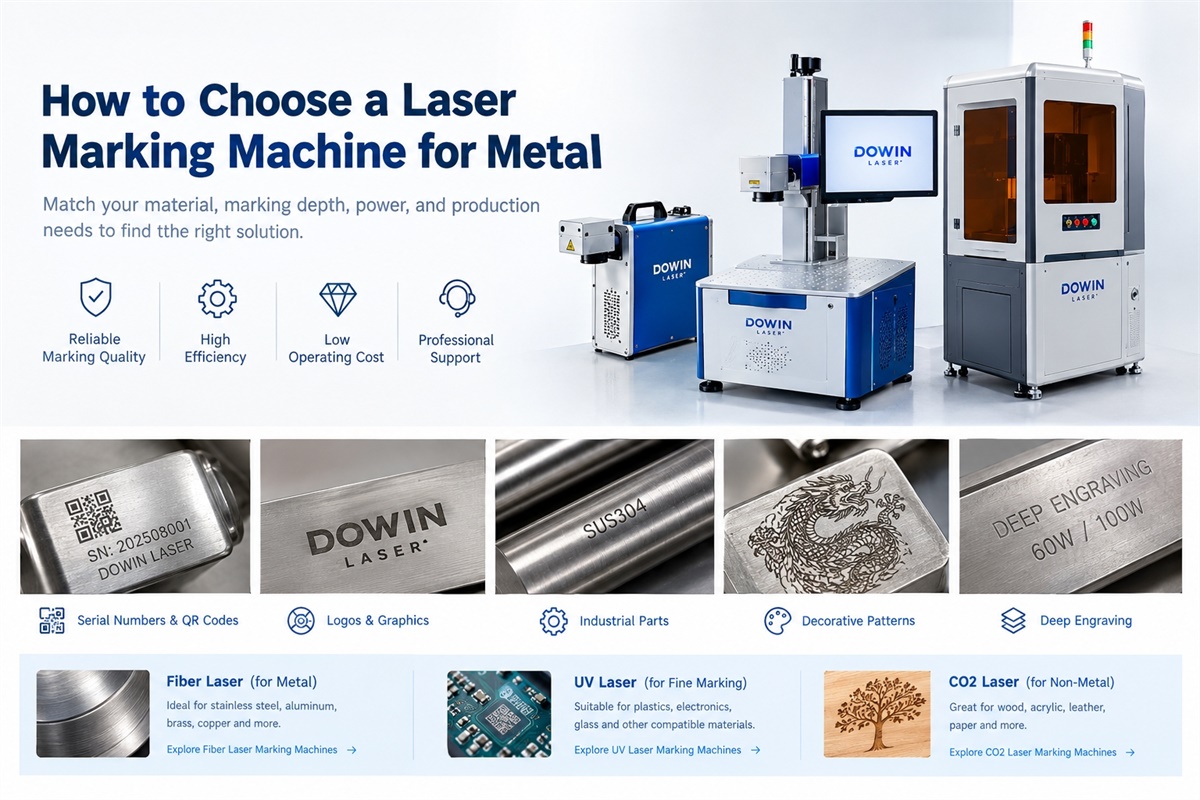
Choosing a laser marking machine for metal requires more than comparing laser power and price. The right machine must match your metal type, marking depth, required contrast, production speed, and daily workload. A machine that performs well on stainless steel may produce a different result on anodized aluminum, brass, or copper.
For most manufacturers, a fiber laser marking machine is the first option to consider for metal marking. However, the best configuration depends on whether you need permanent identification marks, high-contrast logos, QR codes, or deep engraving. This guide explains how to select the right equipment and avoid common purchasing mistakes.
1. Choose the Right Laser Marking Technology
The laser source determines how efficiently the machine processes different materials. Fiber, UV, and CO2 laser marking machines serve different applications, so identifying the correct technology should be your first step.
Fiber Laser Marking Machine for Metal
A fiber laser marking machine typically operates at a wavelength of 1064 nm. It is widely used for marking stainless steel, carbon steel, aluminum, brass, copper, gold, silver, and other suitable metals.
Common applications include:
-
Industrial part numbers and serial numbers
-
QR codes, barcodes, and product traceability
-
Metal logos and nameplates
-
Hardware, tools, and automotive components
-
Jewelry marking and decorative patterns
-
Deep engraving on selected metal parts
Fiber lasers offer high marking efficiency, relatively low routine operating costs, and long service life when properly maintained.
For general industrial metal marking, a fiber laser marking machine is usually the most practical starting point.
UV Laser Marking Machine
A UV laser marking machine typically operates at 355 nm. Its shorter wavelength allows precise processing of compatible materials with limited thermal effects.
UV lasers are particularly useful for electronic components, circuit boards, plastics, glass, and other applications requiring fine details or reduced heat impact.
Although certain metal applications may benefit from UV processing, a UV laser is not automatically the best choice for metal. Test the actual material and required marking result before selecting this technology.
Explore Dowin’s UV laser marking machines for applications requiring high precision.
CO2 Laser Marking Machine
CO2 laser marking machines are primarily designed for non-metal materials such as wood, acrylic, leather, paper, and selected plastics.
They are commonly used for packaging, advertising products, crafts, and other non-metal marking applications. Standard CO2 laser marking is generally not the preferred method for direct marking of bare metal, although some coated metals can be processed by removing or changing the coating.
If your main requirement is marking bare metal, start with a fiber laser rather than a standard CO2 system.
You can compare the available technologies on the Dowin Laser Marking Machines page.
2. How Much Laser Power Do You Need?
Laser power influences marking speed, material removal, and processing capacity. However, choosing a higher-power machine does not automatically produce better results.
The following table provides a practical starting point for conventional fiber laser marking.
| Laser power | Typical applications | Main consideration |
|---|---|---|
| 20W | Serial numbers, logos, QR codes, routine surface marking | Suitable for many general-purpose jobs |
| 30W | Industrial identification, detailed graphics, moderate engraving | A versatile option for mixed workloads |
| 50W | Faster marking and more demanding engraving | Useful when throughput or material removal is important |
| 60W–100W | Deep engraving and demanding production applications | Requires suitable parameters and sample testing |
These ranges are guidelines, not guaranteed performance specifications. Actual results depend on the metal, laser source, pulse characteristics, optical configuration, and processing parameters.
Is a 20W Laser Marking Machine Enough?
For many metal marking applications, yes.
A 20W fiber laser can mark product identification, serial numbers, logos, and QR codes on suitable metal surfaces. It is often a reasonable starting point for small manufacturers, workshops, and businesses with moderate production volumes.
However, a 20W machine may take longer to complete large graphics or deeper engraving jobs. If your production schedule is demanding, compare its actual cycle time with that of a 30W or 50W system.
Dowin offers 20W and 30W desktop fiber laser marking machines for aluminum, copper, stainless steel, and other suitable marking applications.
When Should You Choose a 60W or 100W Machine?
Higher-power machines deserve consideration when you need deeper engraving, faster material removal, or increased throughput.
Dowin’s 60W and 100W deep engraving fiber laser marking machines are relevant options to evaluate for demanding engraving tasks.
Before purchasing, specify the required engraving depth in millimeters. Ask the supplier to test your actual workpiece and measure the resulting depth.
A dark surface mark is not the same as deep engraving. If your application requires a measurable recess, verify material removal rather than judging the result by appearance alone.
3. Select a Machine Based on the Metal Type
Different metals interact with laser energy differently. Surface treatment, reflectivity, alloy composition, and finishing requirements can all influence the final result.
Stainless Steel
Stainless steel is widely used for industrial components, kitchenware, tools, equipment labels, and decorative products.
Fiber laser marking can produce text, logos, serial numbers, and other permanent identification marks. Depending on the grade and processing parameters, it can also create dark surface marks or selected colored effects.
If you require black marking rather than ordinary engraving, tell the supplier. The two results may require different processing strategies.
Aluminum
Aluminum is commonly used for electronic housings, nameplates, machinery, and automotive components.
Fiber lasers can mark many aluminum products, but the result depends on the surface condition.
For example, anodized aluminum may be marked by removing or altering the anodized layer to reveal a contrasting surface. Bare aluminum presents a different processing challenge.
Always test the actual alloy and surface finish before choosing the final configuration.
Carbon Steel and Iron
Carbon steel and iron are common materials for tools, mechanical parts, fixtures, and industrial hardware.
A fiber laser can mark identification information and perform engraving when the power and processing parameters are suitable.
If the mark must remain readable after painting, abrasion, or another manufacturing process, evaluate the finished part under the actual working conditions.
Brass and Copper
Brass and copper are used in electrical components, fittings, decorative products, and precision parts.
These materials require careful parameter selection because their optical and thermal properties differ from those of steel. A fiber laser may be suitable, but the required contrast and processing speed should be confirmed through testing.
Purchasing tip: Do not simply tell a supplier that you need to mark metal. Specify the exact material, alloy if known, surface treatment, marking content, and required appearance.
4. Surface Marking vs. Deep Metal Engraving
Before choosing a machine, determine whether you need a surface mark or actual material removal. This distinction directly affects the required power, processing time, and equipment configuration.
Surface Marking
Surface marking changes the appearance of a material or its surface layer without necessarily removing a significant amount of metal.
Typical applications include:
-
Product identification and serial numbers
-
QR codes and barcodes
-
Company logos and nameplates
-
Manufacturing dates and batch numbers
-
Decorative patterns and lettering
A 20W or 30W fiber laser may be sufficient for many of these tasks, depending on the required contrast and production speed.
Deep Engraving
Deep engraving removes material to create a measurable recess. It is used for tools, industrial components, selected molds, metal plates, and decorative products requiring a more pronounced engraved effect.
Deep engraving generally takes longer than surface marking. Higher power may improve productivity, but the final result also depends on pulse characteristics, scanning speed, hatch spacing, the number of passes, and material properties.
When requesting a quotation, specify the required depth and acceptable processing time. Ask the supplier to demonstrate the result on your material.
For further technical background, visit Dowin’s fiber laser marking application page.
5. Choose the Correct Marking Area
The marking area determines how much of the workpiece can be processed in one setup.
Common field sizes include 110 × 110 mm, 200 × 200 mm, and 300 × 300 mm, although the available options depend on the optical configuration.
| Marking area | Typical applications |
|---|---|
| 110 × 110 mm | Small components, tools, jewelry, compact nameplates |
| 200 × 200 mm | Medium-sized parts and flexible marking layouts |
| 300 × 300 mm | Larger workpieces or multiple parts in one field |
A larger marking field is not always better. Changing the field lens can affect the focused spot size and energy density, which may influence fine detail and engraving performance.
Choose a field that accommodates your actual products while maintaining the marking quality you need.
For rings, shafts, and other cylindrical objects, consider a rotary attachment or dedicated fixture. If you need to mark oversized or irregular workpieces, ask the supplier whether a customized configuration is available.
6. Evaluate Marking Speed and Production Efficiency
Advertised scanning speed is only one factor in determining the productivity of a laser marking machine.
Actual cycle time depends on:
-
The size and complexity of the design
-
The number of characters and graphic details
-
Required contrast and engraving depth
-
Hatch spacing and the number of passes
-
Material and surface condition
-
Workpiece positioning and loading time
For example, a simple serial number may take only a short time to mark, while a large logo requiring deep engraving can take considerably longer.
If your business processes hundreds or thousands of parts per shift, ask the supplier to test a representative workpiece and record the complete cycle time.
You should also consider fixtures, automatic loading, and the time required to position each component. In high-volume production, handling time can be just as important as laser processing time.
When Should You Choose Flying Laser Marking?
For production lines where products move continuously on a conveyor, a flying laser marking system may be more appropriate than a conventional stationary setup.
Dowin provides flying fiber laser marking machine configurations for suitable production-line applications.
Before choosing one, confirm the conveyor speed, marking position, product spacing, triggering method, and required marking quality.
7. Desktop, Portable, or Enclosed: Which Structure Is Better?
The machine structure affects installation, workpiece handling, operator protection, and production efficiency.
Desktop Fiber Laser Marking Machine
A desktop machine is suitable for workshops, production benches, and businesses processing small or medium-sized components.
It offers a compact working arrangement and is a practical option for routine industrial marking.
Portable Fiber Laser Marking Machine
A portable configuration is useful when the workpiece is too large or heavy to move conveniently to a desktop machine.
However, portable models differ in design. Confirm the machine’s weight, marking-head arrangement, cable length, and intended operating method before purchasing.
Enclosed Fiber Laser Marking Machine
An enclosed machine is worth considering when operator protection, consistent positioning, and a controlled working area are priorities.
Dowin offers enclosed fiber laser marking machines with protective enclosure designs.
The required safety measures depend on the laser classification and installation conditions. For Class 4 laser systems, appropriate guarding, interlocks, and other controls are important. Confirm the equipment’s safety configuration and compliance requirements for your workplace.
8. Check the Software, Fixtures, and Optional Equipment
A laser marking machine is more than its laser source. Software, positioning, and workpiece handling can significantly influence day-to-day productivity.
Before purchasing, evaluate the following:
Marking software: Can it handle your text, logos, vector files, serial numbers, barcodes, and QR codes? Does it support automatic numbering or database-based marking if required?
Positioning: Can the operator align each workpiece accurately? Would a camera or vision positioning system reduce setup time for irregular parts?
Fixtures: Can your parts be held securely and positioned consistently? For cylindrical components, would a rotary attachment improve repeatability?
Laser source and scanning system: Ask about the source manufacturer, warranty, scanning-head specifications, and available technical support.
Maintenance and service: Confirm replacement-part availability, troubleshooting support, and software assistance.
For repeat production, consistent positioning and reliable operation may be more valuable than a small increase in advertised scanning speed.
9. Compare the Total Cost of Ownership
The initial purchase price is only one part of the investment.
When comparing laser marking machines, consider:
-
Machine purchase price
-
Laser source and component warranty
-
Installation and operator training
-
Fixtures and optional accessories
-
Safety enclosure and extraction, where required
-
Maintenance and replacement parts
-
Labor and actual cycle time
-
Scrap and rework caused by inconsistent marking
Fiber laser marking machines are attractive because they generally do not require ink or routine marking consumables. However, optical components and other parts still require appropriate care and occasional replacement.
A lower-priced machine may not be the best value if it cannot meet your required engraving depth, contrast, or production speed.
For a fair comparison, ask each supplier to process the same workpiece using the same acceptance criteria.
10. Which Laser Marking Machine Fits Your Application?
Use the following recommendations as a starting point when narrowing down your options.
| Your application | Configuration to evaluate |
|---|---|
| Serial numbers and QR codes on steel components | 20W–30W fiber laser marker |
| General-purpose metal marking | 20W–30W fiber laser marker |
| Higher-throughput marking and more demanding engraving | 30W–50W fiber laser marker |
| Deep engraving on suitable metal components | 60W–100W fiber laser marker, subject to testing |
| Fine marking on selected heat-sensitive materials | UV laser, if sample tests support the choice |
| Cylindrical parts and rings | Fiber laser with a suitable rotary attachment |
| Continuous production-line marking | Flying fiber laser marking system |
| Large or difficult-to-move workpieces | Portable or customized marking configuration |
These recommendations are not fixed specifications. The best configuration depends on your material, required marking quality, depth, production volume, and available budget.
11. Why Should You Test Samples Before Buying?
A sample test is one of the most reliable ways to determine whether a laser marking machine fits your requirements.
Before placing an order, prepare a representative workpiece and confirm the following:
-
Material: Identify the metal and its surface treatment, such as polishing, anodizing, plating, or painting.
-
Marking content: Provide the actual logo, text, serial number, or QR code.
-
Appearance: Specify whether you need a dark mark, light engraving, high-contrast code, or decorative pattern.
-
Depth: State the target engraving depth if material removal is required.
-
Cycle time: Define the maximum acceptable processing time per part.
-
Durability: If the mark must withstand abrasion, cleaning, or later manufacturing processes, test it under relevant conditions.
Ask the supplier to document the test parameters and provide sample photos or videos. If engraving depth or durability is important, inspect the actual sample using an appropriate measurement method.
A successful test should demonstrate that the machine can achieve the required quality consistently and within your production limits.
12. Consider Dowin Laser for Metal Marking
Dowin Laser offers several types of laser marking equipment for different materials and production requirements.
For metal identification, logos, serial numbers, and engraving, start by reviewing the Dowin fiber laser marking machine range. The product category includes desktop, portable, enclosed, flying, and deep engraving configurations.
If your application requires precise marking on compatible heat-sensitive materials, explore the UV laser marking machine range. For non-metal applications such as packaging and wood marking, review the CO2 laser marking machines.
You can also visit the complete Dowin Laser Marking Machines catalog to compare the available technologies.
When requesting a quotation, provide your material, surface finish, marking design, target depth, marking area, and expected daily output. These details help identify a suitable configuration instead of choosing a machine based on power or price alone.
Frequently Asked Questions
1. What is the best laser marking machine for metal?
For most conventional metal marking applications, a fiber laser marking machine is the first option to consider. The appropriate power and configuration depend on the material, required contrast, engraving depth, and production volume.
2. Can a 20W fiber laser mark stainless steel?
Yes. A 20W fiber laser can mark stainless steel with text, logos, serial numbers, and many other patterns. The final contrast and processing time depend on the steel grade, surface finish, and laser parameters.
3. What power is needed for deep metal engraving?
Higher-power fiber lasers, such as 50W, 60W, or 100W systems, may be suitable for deeper engraving. The appropriate choice depends on the target depth, material, and acceptable processing time. Always test the actual workpiece.
4. Can a fiber laser mark aluminum?
Yes. Fiber lasers can mark many aluminum products, including suitable bare and anodized surfaces. However, the marking method and final contrast may differ depending on the surface treatment.
5. Is a UV laser better than a fiber laser for metal?
Not generally. Fiber lasers are usually the first choice for conventional industrial metal marking. UV lasers may be appropriate for specialized applications where fine detail or reduced thermal impact is important, but the result should be verified through testing.
6. How much does a metal laser marking machine cost?
The price depends on laser power, source brand, marking area, machine structure, safety enclosure, automation, and accessories. Compare quotations using the same sample and acceptance criteria.
7. Can a laser marking machine mark curved metal surfaces?
Yes, within the capabilities of the selected configuration. A rotary attachment can help mark cylindrical parts and rings. More complex curved surfaces may require specialized fixtures or optical configurations.
8. What information should I provide when requesting a quotation?
Provide the metal type, surface finish, workpiece dimensions, marking design, required depth, marking area, production volume, and target cycle time. A physical sample is particularly useful when the required contrast or engraving depth is difficult to describe.
Conclusion
Choosing the right laser marking machine for metal begins with understanding your actual production requirements.
For most conventional metal marking applications, a fiber laser offers a practical combination of marking quality, speed, and operating cost. A 20W or 30W machine may be sufficient for routine identification, while higher-power systems are worth evaluating for deeper engraving and more demanding production workloads.
Before purchasing, test the actual material, verify the marking quality, measure the cycle time, and compare the complete machine configuration. This approach helps you select equipment that meets your technical requirements without paying for unnecessary capabilities.
Post time: Oct-26-2026
