
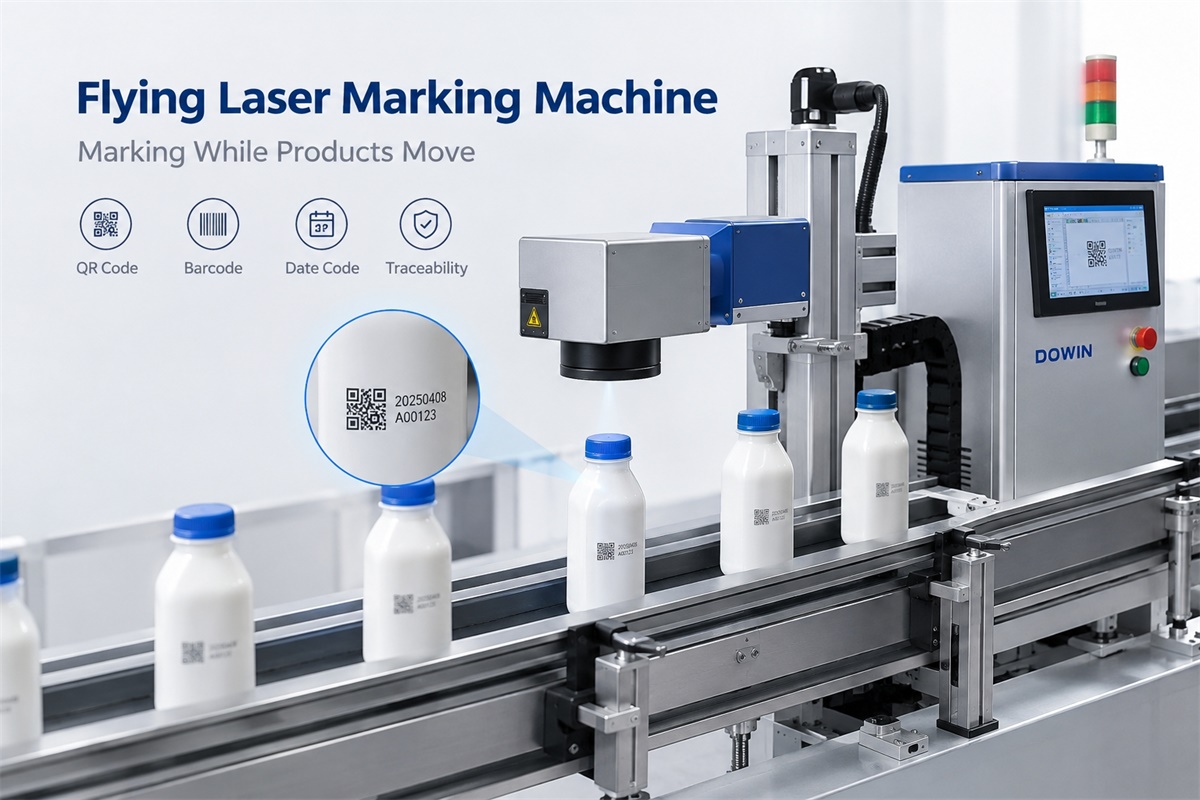
A flying laser marking machine marks products while they move along a production line, eliminating the need to stop every item for individual marking. For manufacturers handling high-volume production, an integrated Dowin flying laser marking solution can be used to apply dates, batch numbers, QR codes, barcodes, and product identification directly to moving products. The key is not simply laser speed, but the coordination of the laser marking head, conveyor, encoder, sensor, and marking software.
What Is a Flying Laser Marking Machine?
A flying laser marking machine is an industrial laser marking system designed to operate while products are moving. It is also known as an online laser marking machine, inline laser marking system, or conveyor laser marking machine.
Unlike a conventional static laser marker, which generally requires a workpiece to remain stationary during marking, a flying laser marking system synchronizes its marking process with the movement of products on a conveyor or production line.
This makes it suitable for manufacturers that need consistent product identification without introducing an unnecessary stop-and-start operation.
Typical applications include:
-
Printing production dates and batch numbers on packaging.
-
Marking serial numbers and identification codes on metal components.
-
Applying product information to plastic bottles, pipes, and cables.
-
Marking QR codes and barcodes for traceability.
-
Adding logos and manufacturing information to industrial products.
For example, Dowin’s wire and cable laser marking solution illustrates how flying marking can be integrated into continuous production processes where identification must be applied at regular intervals.
How Does a Flying Laser Marking Machine Work?
A flying laser marking system typically consists of a laser source, galvanometer scanning head, marking controller, encoder, photoelectric sensor, and a conveyor or existing production line.
Each component has a different role, but they must work together to achieve reliable marking.
1. The Sensor Detects the Product
When a product enters the marking area, a photoelectric sensor or another suitable detection device identifies its presence.
The sensor sends a trigger signal to the marking controller, allowing the system to determine when marking should begin.
The detection position must be configured according to the product size, conveyor speed, and distance between the sensor and laser marking position.
Incorrect sensor positioning can cause missed marks, incorrect placement, or inconsistent spacing between marked products.
2. The Encoder Measures Conveyor Speed
The encoder is one of the most important components of a flying laser marking machine.
As the conveyor moves, the encoder generates signals corresponding to its movement. The controller uses these signals to track the production line’s speed and coordinate the marking process.
If the conveyor speeds up or slows down, the system can adjust the marking timing and scanning movement accordingly, within its operating limits.
Without reliable speed feedback, a marking system may struggle to maintain consistent positioning when conveyor speed changes.
For this reason, an encoder-based system is particularly useful for production lines that do not operate at a perfectly constant speed.
3. The Galvanometer Scanner Directs the Laser Beam
The laser source generates the beam, while the galvanometer scanning head directs it across the marking field.
By moving the beam rapidly according to a programmed design, the scanner creates characters, logos, numbers, barcodes, and other patterns.
In a flying laser marking application, the scanner must coordinate its movements with the movement of the workpiece.
The controller compensates for product movement so that the intended marking can be formed in the correct position while the product passes through the marking area.
The achievable result depends on several factors, including scanner performance, laser power, marking content, material characteristics, and conveyor speed.
4. The Software Synchronizes Marking With Product Movement
Flying marking software connects product detection, encoder feedback, and laser control into a coordinated process.
A typical sequence works as follows:
-
The product enters the detection area.
-
The sensor sends a trigger signal.
-
The encoder provides conveyor movement information.
-
The controller calculates the appropriate marking timing and motion compensation.
-
The galvanometer scans the programmed content onto the moving product.
-
The product continues downstream without needing to stop for the marking operation.
Some applications also require communication with a PLC, production management system, or variable-data source to update dates, serial numbers, or batch information automatically.
The exact integration method depends on the machine configuration and the customer’s existing production line.
Flying Laser Marking vs. Stop-and-Go Marking
Not every automated marking application requires the product to remain in continuous motion. Two common approaches are flying marking and stop-and-go marking.
| Feature | Flying laser marking | Stop-and-go laser marking |
|---|---|---|
| Product movement | Marking occurs while the product moves | Product pauses during marking |
| Production flow | Suitable for continuous lines | Suitable for indexed or intermittent lines |
| Position control | Requires synchronization with product movement | Relies on accurate positioning during the pause |
| Integration | Encoder and triggering are commonly used | Position sensors and motion controls may be used |
| Typical applications | Bottling, packaging, pipes, cables | Components requiring a fixed marking position |
| Main consideration | Matching marking capability to line speed | Managing cycle time and stopping accuracy |
Flying marking is often preferable when stopping products would restrict production throughput. Stop-and-go marking can be more appropriate when workpieces require precise positioning, longer marking cycles, or a more controlled marking interval.
The right choice depends on the complete production process rather than the marking machine alone.
Which Laser Type Is Suitable for a Flying Marking System?
Choosing the correct laser source is essential because different materials respond differently to laser wavelengths.
Fiber Laser Flying Marking Machine
Fiber laser systems are widely used for industrial marking on metals and suitable metal-related surfaces.
Typical applications include:
-
Stainless steel and carbon steel components.
-
Aluminum and anodized aluminum.
-
Metal fittings, tools, and hardware.
-
Industrial parts requiring serial numbers or traceability codes.
Fiber lasers can also mark certain plastics and coated materials, but the result depends on the material formulation and surface treatment.
CO2 Flying Laser Marking Machine
CO2 laser marking systems are commonly considered for suitable nonmetallic materials.
Typical applications include:
-
Selected plastic packaging.
-
Labels and packaging materials.
-
Pipes and certain cable materials.
-
Other compatible nonmetallic surfaces.
For a practical example, see Dowin’s CO2 flying laser marking machine for plastic bottles and packaging.
Material compatibility should always be confirmed through sample testing. Plastic formulations, pigments, coatings, and additives can produce significantly different marking results.
UV Flying Laser Marking Machine
UV laser marking is worth evaluating when a material requires fine marking or when a lower-thermal-impact process is beneficial.
Potential applications include:
-
Selected plastics and packaging materials.
-
Electronic components.
-
Fine product identification.
-
Materials that respond poorly to other laser wavelengths.
UV is not automatically the best choice for every plastic. Marking contrast, line speed, surface damage, and code readability must be evaluated on the actual material.
Practical selection rule: Choose the laser source according to the material and required marking result first, then verify that the system can meet the production line’s speed requirements.
How Fast Can a Flying Laser Marking Machine Work?
There is no single production speed that applies to every flying laser marking machine.
A machine may advertise a high scanning speed in millimeters per second, but this figure does not directly indicate how many products it can mark per minute.
Actual throughput depends on:
-
Conveyor speed.
-
Character size and marking area.
-
Number of characters and graphic complexity.
-
Required contrast and marking depth.
-
Material absorption and laser parameters.
-
Product spacing and triggering accuracy.
-
The number of marking heads and available processing time.
For example, marking a short date code on a packaging surface is generally less demanding than marking a large logo or a detailed QR code.
Consider a production line running at 30 meters per minute. The conveyor speed is approximately 500 mm/s. If products are spaced 100 mm apart, the line presents approximately five products per second, or 300 products per minute, at the marking station.
This is the theoretical product arrival rate, not a guarantee that the marking system can complete 300 marks per minute.
The laser must finish each mark within the available time, and the marking area, code complexity, and synchronization capability must support that rate.
Before purchasing a machine, test a representative sample at the intended line speed and measure the complete production result.
What Products Can Be Marked on a Production Line?
Flying laser marking is useful in industries where product identification must keep pace with manufacturing.
1. Bottles and Packaging
Beverage, food, cosmetics, and pharmaceutical packaging may require production dates, batch codes, barcodes, and other identification information.
A flying laser marking machine can integrate with a conveyor to mark compatible packaging without stopping each item.
Explore Dowin’s laser marking solutions for packaging for examples involving production-line marking.
2. Pipes and Cables
Pipe and cable manufacturers often need to apply company names, specifications, standards, and traceability information repeatedly along continuous products.
A synchronized flying laser marking system can coordinate marking with the movement of the material.
The laser wavelength must be matched to the pipe or cable material, and the system must account for line speed and the required marking interval.
3. Metal Parts and Industrial Components
Manufacturers of metal components may need to mark serial numbers, logos, part numbers, or identification codes during production.
Fiber laser systems are common candidates for compatible metal surfaces. The appropriate laser power, marking field, and scanning parameters depend on the required contrast, marking depth, and component geometry.
4. Electronics and Precision Components
Electronic components may require compact identification marks, production codes, or traceability information.
In these applications, code readability, marking position, thermal effects, and consistency are important. UV or fiber laser configurations may be suitable depending on the material and marking requirements.
How to Integrate a Flying Laser Marking Machine Into an Existing Production Line
Installing a flying laser marker is not simply a matter of placing a laser head above a conveyor. The machine must fit the physical layout and control logic of the existing production process.
Step 1: Confirm the Product and Marking Position
Determine where the marking should appear on each product.
Consider product height, orientation, surface curvature, spacing, and whether the marking surface remains visible and accessible during movement.
If products rotate, wobble, or shift laterally, additional guides, fixtures, or tracking arrangements may be necessary.
Step 2: Measure the Actual Line Speed
Record both normal operating speed and the maximum required speed.
If the conveyor frequently accelerates or decelerates, confirm that the encoder and controller can track the changes accurately enough for the intended marking result.
Step 3: Check the Available Installation Space
Measure the distance between the conveyor and the intended laser head position.
Check mounting height, working distance, marking field, access for maintenance, and clearance for existing equipment.
The mounting structure should also be stable enough to prevent unwanted movement that could affect marking position.
Step 4: Coordinate With the PLC and Production Controls
Depending on the application, the laser marking system may need trigger signals, product detection, encoder feedback, and communication with a PLC or other control system.
For variable-data marking, determine how the machine receives updated information and how duplicate, missing, or incorrect codes will be handled.
Step 5: Validate Marking Quality at Production Speed
Run sample products under actual operating conditions.
Check marking position, contrast, code readability, consistency, and the system’s ability to maintain performance during speed changes.
For applications involving QR codes or barcodes, verify that the finished codes can be read reliably using the intended scanning equipment.
Step 6: Confirm Safety Requirements
Laser marking equipment must be integrated with appropriate protective measures.
Depending on the laser class and installation, these may include an enclosure, interlocks, beam shielding, warning indicators, controlled access, and suitable fume extraction.
The safety arrangements should be evaluated for the complete production line, not just the laser marking unit.
Common Problems With Flying Laser Marking Machines
Even a suitable laser source can produce inconsistent results if the production line and marking system are poorly matched.
Marking Position Shifts as Conveyor Speed Changes
Possible causes: Incorrect encoder settings, insufficient motion compensation, unstable product movement, or incorrect trigger timing.
What to check: Verify encoder calibration, signal quality, conveyor speed data, and the distance between the sensor and marking position.
Marking Becomes Incomplete at High Speed
Possible causes: Excessive marking content, insufficient processing time, unsuitable laser parameters, or limitations in the scanner and controller.
What to check: Reduce unnecessary graphic complexity where possible, review the required contrast, and conduct sample tests at the target speed.
Increasing laser power alone may not solve the problem.
QR Codes or Barcodes Cannot Be Read Reliably
Possible causes: Insufficient contrast, unsuitable code dimensions, inconsistent product positioning, or inadequate marking quality.
What to check: Test the actual code using the intended reader. Verify code size, module dimensions, quiet zones, contrast, and marking consistency.
Marking Quality Changes Between Materials
Possible causes: Differences in material composition, coatings, color, surface finish, or laser absorption.
What to check: Test representative samples from the actual production batch and establish appropriate marking parameters for each material variation.
The Laser Marker Becomes a Production Bottleneck
Possible causes: The marking cycle is longer than the available product interval, or the marking system cannot handle the required content at the intended line speed.
What to check: Calculate the real product arrival rate, measure the complete marking cycle, and evaluate whether a different configuration or production-line arrangement is required.
How to Choose the Right Flying Laser Marking Machine
When comparing suppliers, focus on the complete application rather than a single advertised speed.
Use this checklist to prepare your requirements:
-
Material: Specify the exact metal, plastic, coating, pipe, cable, or packaging material.
-
Marking content: Provide examples of dates, text, logos, serial numbers, or codes.
-
Production speed: State the normal and maximum conveyor speeds.
-
Product spacing: Measure the distance between consecutive products.
-
Marking position: Specify the surface, location, and required orientation.
-
Quality requirements: Define acceptable contrast, depth, code readability, and positional tolerance.
-
Integration requirements: Identify the conveyor, encoder, sensors, PLC, and variable-data interfaces.
-
Safety requirements: Confirm the required enclosure and protective measures for the installation.
A supplier should be able to evaluate these details and recommend a suitable laser source, scanner, control system, and mounting configuration.
Where possible, send representative samples for testing before finalizing the machine specification.
Is a Flying Laser Marking Machine Better Than Inkjet Coding?
Flying laser marking and inkjet coding can both be used for online product identification, but they have different operating characteristics.
Laser marking does not require marking ink, making it attractive for applications where ink consumption, replenishment, and smearing are concerns. Depending on the material and process, laser marks can also offer durable identification.
Inkjet systems may be more suitable where the production process requires a particular color, where marking must be easily changed or removed, or where the substrate is not compatible with the available laser process.
The comparison should include the initial investment, maintenance, consumables, marking quality, production speed, substrate compatibility, and safety requirements.
The best choice is the system that meets the product’s identification requirements at the lowest practical total operating cost.
Frequently Asked Questions
1. Does a flying laser marking machine stop the conveyor?
No. In a typical flying marking setup, products continue moving while the laser marks them. The encoder, sensor, and controller coordinate the marking process with product movement.
2. Can a flying laser marking machine mark products at different conveyor speeds?
Many systems can compensate for changes in conveyor speed when configured with suitable encoder feedback and control software. The allowable speed range and acceleration response depend on the specific system and application.
3. Which laser is best for a flying marking machine?
Fiber lasers are common for metals, CO2 lasers are widely considered for suitable nonmetallic materials, and UV lasers can be useful for selected plastics and fine-marking applications. Sample testing is necessary to confirm compatibility and performance.
4. Can a flying laser marking machine print changing dates and serial numbers?
Yes, if the marking controller and software support the required variable-data input. The system can be configured for information such as production dates, batch numbers, serial numbers, and unique identification codes.
5. What is the difference between a flying laser marker and an online laser marking machine?
The terms are often used interchangeably. Both generally describe a laser marking system integrated into a production line. However, the term “online laser marking system” can also refer more broadly to automated marking equipment that operates within a manufacturing process.
6. How do I calculate the required marking speed?
Start with the conveyor speed, product spacing, and marking content. Calculate how frequently products reach the marking station, then verify through testing that the system can complete each mark within the available time while meeting the required quality standards.
7. Can a flying laser marking machine replace an inkjet printer?
It can replace inkjet coding in suitable applications, but not every substrate or production requirement is compatible with laser marking. Test the material and compare marking quality, operating cost, line speed, and safety requirements before making the change.
Conclusion
A flying laser marking machine allows manufacturers to apply product identification while products continue moving along the production line. Its performance depends on the coordination of the laser source, galvanometer scanner, encoder, sensor, and control software.
For high-volume production, the most important purchasing decision is not simply choosing the fastest laser. It is selecting a system that can maintain marking quality at the required conveyor speed, integrate reliably with existing equipment, and work with the actual product material.
If you are planning to automate production-line marking, explore Dowin’s flying laser marking and packaging solutions and wire and cable marking applications. Prepare your material details, marking content, line speed, and product dimensions before requesting a configuration recommendation.
Post time: Oct-27-2026
