
DTF printing allows businesses to produce customized apparel, promotional products, and heat transfer designs in small or large batches. However, printing is only one stage of the production process. Cutting printed PET film, separating individual designs, and preparing transfers for further processing can consume significant labor and production time.
For print shops handling multiple orders every day, manual cutting can quickly become a bottleneck. A dedicated DTF film cutter helps automate these repetitive tasks, improve cutting consistency, and reduce unnecessary material handling.
So, how does a DTF film cutter work, and when does investing in one make financial sense? The answer depends on your production volume, cutting requirements, and the way your current DTF workflow is organized.
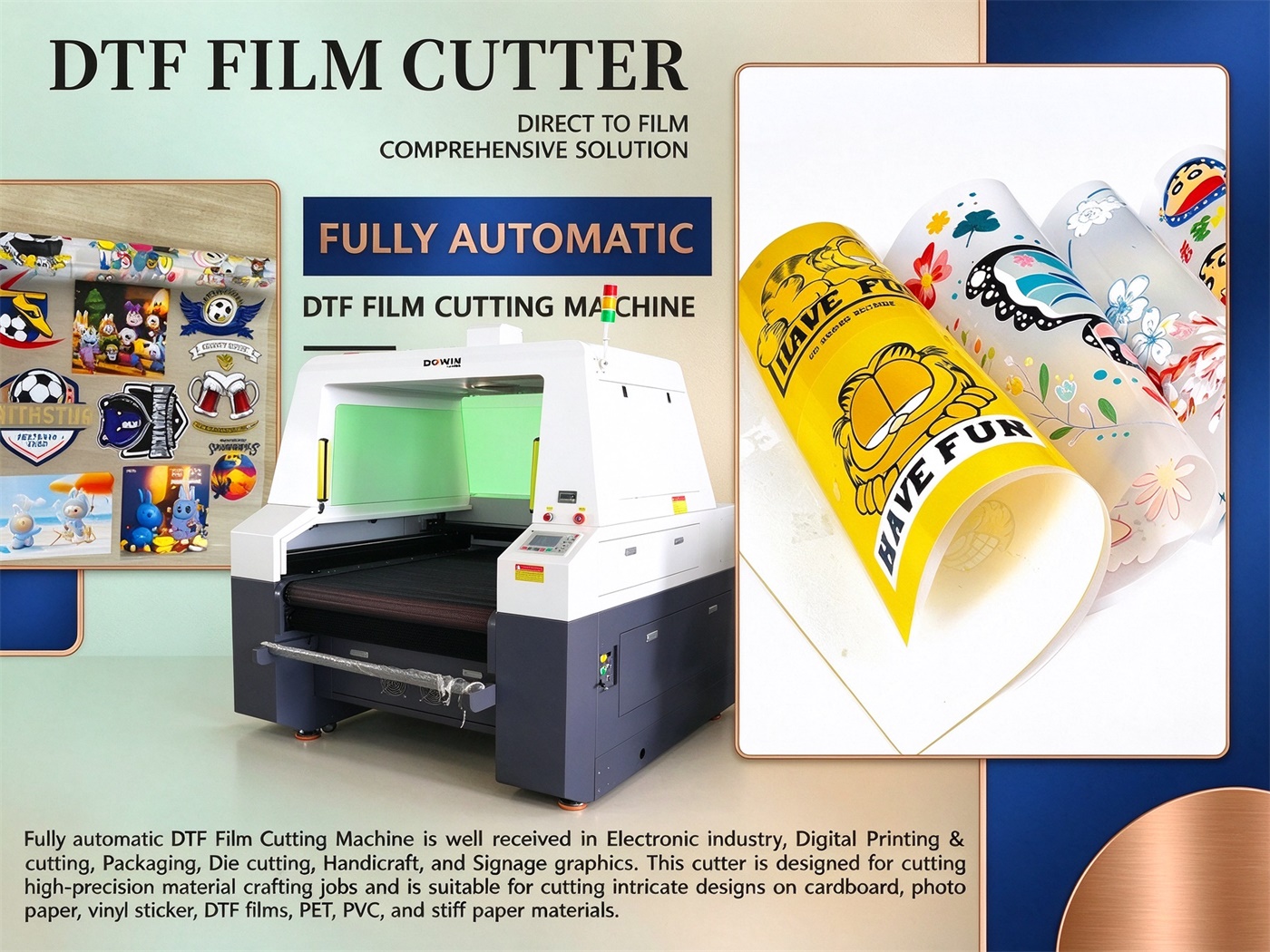
1. What Is a DTF Film Cutter and How Does It Work?
A DTF film cutter is a machine designed to cut transfer film according to predefined patterns or cutting paths. Depending on its configuration, it can process individual printed designs, long film rolls, and specialized cutting patterns for transfer applications.
A typical workflow includes four main steps.
Step 1: Prepare the cutting file. The design is imported into compatible software, where the operator sets the cutting paths, dimensions, spacing, and other job parameters.
Step 2: Load and position the film. The printed PET film is positioned in the cutting area. Roll-to-roll systems may use automatic feeding to move the material through the machine.
Step 3: Execute the cutting process. The machine follows the programmed paths using its cutting mechanism. Depending on the equipment, this may involve mechanical blades or laser processing.
Step 4: Inspect and organize the finished film. The operator checks cutting accuracy, separates designs where necessary, and organizes the finished transfers for subsequent production steps.
The exact process varies by machine type. Contour cutting, straight-line cutting, perforation, and continuous roll processing may require different equipment configurations.
2. Five Ways a DTF Film Cutter Saves Time
2.1 Reduce Manual Cutting Work
Manual trimming requires operators to repeatedly position film, follow design boundaries, and handle individual pieces. These tasks become time-consuming when processing large orders or multiple small graphics.
An automated cutter follows programmed cutting paths, reducing repetitive manual operations. Operators can focus on preparing new jobs, inspecting finished products, and coordinating other production tasks.
The greatest benefit typically appears in businesses processing repeated designs or large quantities of printed film.
2.2 Increase Production Throughput
A dedicated cutting machine can help prevent the cutting stage from slowing down the entire DTF production line.
For example, a print shop may be able to print film faster than workers can manually trim and organize the finished designs. In this situation, automating cutting can reduce the backlog between printing and transfer preparation.
Actual throughput depends on cutting speed, design complexity, material feeding, machine setup, and the time needed to unload finished material. A machine’s advertised maximum speed should not be treated as its guaranteed production output.
2.3 Simplify Roll-Based Production
Many DTF printing businesses work with roll-based PET transfer film, including common 60 cm formats. Manually handling long rolls can introduce additional steps and interrupt production.
A compatible roll-to-roll cutter can feed material through the cutting area and process multiple designs in sequence. Automatic feeding may reduce manual repositioning and help maintain a more continuous workflow.
For businesses handling frequent repeat orders, this can make production planning easier and reduce interruptions between jobs.
2.4 Make Order Changes Easier
Custom printing businesses often switch between different artwork, dimensions, and customer orders. Manual cutting can require repeated measurements and adjustments for each new design.
Digital cutting files make it easier to switch between jobs, provided that the machine software supports the required file formats and cutting operations.
This flexibility is useful for print-on-demand businesses, garment decorators, and wholesalers producing different designs in small batches.
2.5 Reduce Rework and Cutting Errors
Incorrect dimensions, uneven edges, and misplaced cuts can result in damaged transfers or additional manual work.
A properly configured cutter follows programmed paths and can deliver more repeatable results than manual trimming. For printed contour cutting, accurate registration is especially important because the cutting path must align with the artwork.
However, automation does not eliminate every error. Film movement, incorrect files, poor registration, and unsuitable cutting parameters can still affect quality. Testing and routine inspection remain essential.
3. How Much Money Can a DTF Film Cutter Save?
The financial benefit of a DTF film cutter comes primarily from reduced labor requirements, lower rework rates, improved material utilization, and greater usable production capacity.
Rather than relying on general claims about percentage savings, businesses should estimate their own costs using actual production data.
Consider a simplified example:
A print shop spends three hours per day on manual film cutting. Its fully loaded labor cost is $8 per hour, and it operates 26 days per month.
Manual cutting labor costs:
3 hours × $8 × 26 days = $624 per month
Suppose automation reduces the active labor required for cutting to one hour per day. The remaining labor cost would be:
1 hour × $8 × 26 days = $208 per month
The potential labor-cost reduction would be $416 per month, before accounting for machine expenses, maintenance, setup time, and any additional operator duties.
These figures are illustrative, not a guaranteed saving or a claim about a particular machine.
To estimate your return on investment, consider:
-
Current daily labor hours spent cutting film.
-
Labor costs, including relevant employment expenses.
-
Expected labor reduction after automation.
-
Machine purchase and installation costs.
-
Maintenance and consumable expenses.
-
Changes in material waste and rework.
-
Additional production capacity that can actually be sold.
A useful formula is:
Monthly net savings = labor savings + material savings + additional contribution from extra production − monthly machine operating costs
The initial investment can then be compared with the estimated monthly net savings to calculate a potential payback period.
4. DTF Film Cutter vs. Manual Cutting
| Factor | Manual Cutting | Automated DTF Film Cutter |
|---|---|---|
| Labor requirements | Repetitive hands-on work | Less repetitive manual cutting |
| Cutting consistency | Depends heavily on operator technique | More repeatable with correct setup |
| Large production batches | Can become labor-intensive | Better suited to repetitive jobs |
| Switching designs | Requires manual repositioning and measurement | Digital files can simplify job changes |
| Material utilization | Depends on manual layout and technique | Digital layouts can support optimization |
| Initial investment | Low | Higher equipment investment |
| Maintenance | Basic hand-tool replacement | Depends on machine type and configuration |
Manual cutting may remain economical for occasional orders and very small production volumes. Automation becomes more attractive when cutting consumes substantial labor time or creates a bottleneck.
The decision should be based on the total cost per acceptable finished transfer, not simply the purchase price of the machine.
5. Which DTF Film Cutter Features Matter Most?
Choosing a machine based only on its maximum speed or number of cutting heads can lead to a poor investment. The configuration should match the actual production workflow.
Working Width and Film Compatibility
Confirm that the machine accommodates your film width, thickness, and roll format. If you regularly use 60 cm PET film, check the usable cutting width rather than relying solely on the machine’s nominal dimensions.
If you also process TPU films or other specialty materials, request compatibility testing for each material type.
Single-Head or Dual-Head Configuration
A dual-head machine may improve productivity when its design allows the heads to perform suitable operations efficiently. However, two heads do not automatically mean twice the output.
Ask the supplier to demonstrate the machine using your typical artwork, film width, and production files.
Automatic Feeding
For roll-based production, automatic feeding can reduce manual handling and support longer cutting runs. Pay attention to feeding accuracy, film alignment, tension control, and the ease of loading new rolls.
Contour Cutting Accuracy
If your business cuts printed graphics along their outlines, registration accuracy is essential. Confirm the machine’s registration method and test it using printed film with different shapes and design sizes.
Specialized Cutting Patterns
Some transfer-film applications require dotted lines, perforations, or connecting points that keep designs attached to a larger section during handling. Verify that the machine supports the required pattern and that the finished material can be separated as intended.
Software and Workflow Compatibility
Check whether the cutter supports your existing design files and production process. Easy file preparation, repeatable parameter settings, and straightforward job switching can reduce setup time.
6. Is a Laser DTF Film Cutter Better Than a Knife Cutter?
The best cutting technology depends on the film and the intended operation.
A knife-based cutter uses a mechanical blade and can be suitable for conventional contour cutting and applications where thermal effects must be avoided. Blade condition, cutting pressure, material thickness, and motion accuracy affect its performance.
A laser film cutter uses focused laser energy rather than a mechanical blade. It can be useful for compatible materials and certain specialized cutting patterns, but heat can cause melting, deformation, discoloration, or damage to printed layers.
Not all DTF films are suitable for laser processing. Material composition, coatings, thickness, and printing characteristics must be evaluated before choosing this technology.
When comparing machines, test the same film and cutting pattern on each system. Compare edge quality, registration accuracy, processing time, material waste, and maintenance requirements.
7. How to Integrate a DTF Film Cutter into Your Production Workflow
To get the most from a cutting machine, coordinate it with the other stages of DTF production.
First, prepare the artwork and cutting file. Check the dimensions, spacing, and design boundaries before printing.
Next, print the artwork onto compatible transfer film and complete the required downstream printing process. Ensure that the film is ready for the selected cutting method.
Then, load the film into the cutter, align the artwork, and configure the appropriate cutting parameters. Run a test section before processing the full order.
After cutting, inspect the finished designs for alignment, edge quality, and dimensional consistency. Separate and organize the transfers according to customer order or production batch.
Finally, monitor cutting time, rejected pieces, operator involvement, and material waste. These measurements help determine whether the machine is improving productivity and where further adjustments are needed.
For growing businesses, the goal is not simply to cut film faster. It is to establish a repeatable process that moves orders from printing to finished transfers with fewer interruptions.
8. Choosing a DTF Film Cutting Machine for Your Business
If manual cutting is slowing down your operation, start by identifying the main production bottleneck.
For low-volume shops, a basic cutter may be sufficient. For businesses processing long rolls, repeated designs, or high order volumes, a roll-compatible machine with automatic feeding may offer greater practical value.
If you need multiple cutting heads, perforated lines, or specialized film handling, confirm these capabilities with the manufacturer rather than assuming they are standard features.
Dowin offers laser cutting equipment for textile and related material-processing applications. You can review the Dowin fabric automatic feeding laser cutting machine to explore automated material feeding and cutting solutions. For a DTF film application, confirm the machine’s compatibility with your specific PET or TPU film, required cutting pattern, and production volume before selecting a model.
Frequently Asked Questions
Do I need a DTF film cutter for a small printing business?
Not necessarily. Manual cutting may be adequate for low order volumes. A dedicated cutter becomes more valuable when repetitive cutting consumes significant labor time or limits your ability to fulfill orders.
Can a DTF film cutter reduce production costs?
It can reduce some labor and rework costs, but the actual benefit depends on machine price, production volume, operator involvement, material waste, and maintenance expenses. Calculate the expected savings using your own production figures.
Can a DTF film cutter process PET and TPU film?
Many cutters can process certain PET or TPU films, but compatibility depends on the machine and material specifications. Confirm the permitted thickness and processing method with the supplier.
Does a dual-head DTF cutter double productivity?
Not necessarily. Output depends on the machine design, cutting paths, material handling, and job complexity. Request a production test using representative files.
Is a laser cutter suitable for all DTF transfer films?
No. Some films may melt, deform, or release hazardous fumes when exposed to laser energy. Verify material compatibility and appropriate exhaust requirements before processing.
What should I compare before buying a DTF film cutter?
Compare usable working width, film compatibility, cutting accuracy, registration, automatic feeding, software, demonstrated production output, maintenance, and after-sales support.
Conclusion
A DTF film cutter can save time and reduce production costs by automating repetitive cutting tasks, improving consistency, and simplifying roll-based production. Its financial value depends on how much manual work it replaces and how effectively it fits into the existing DTF workflow.
Before investing, evaluate your daily cutting workload, test your actual film, and compare the cost per acceptable finished transfer. The right machine should address a measurable production bottleneck rather than simply offer the highest advertised speed.
Post time: Oct-13-2026
