
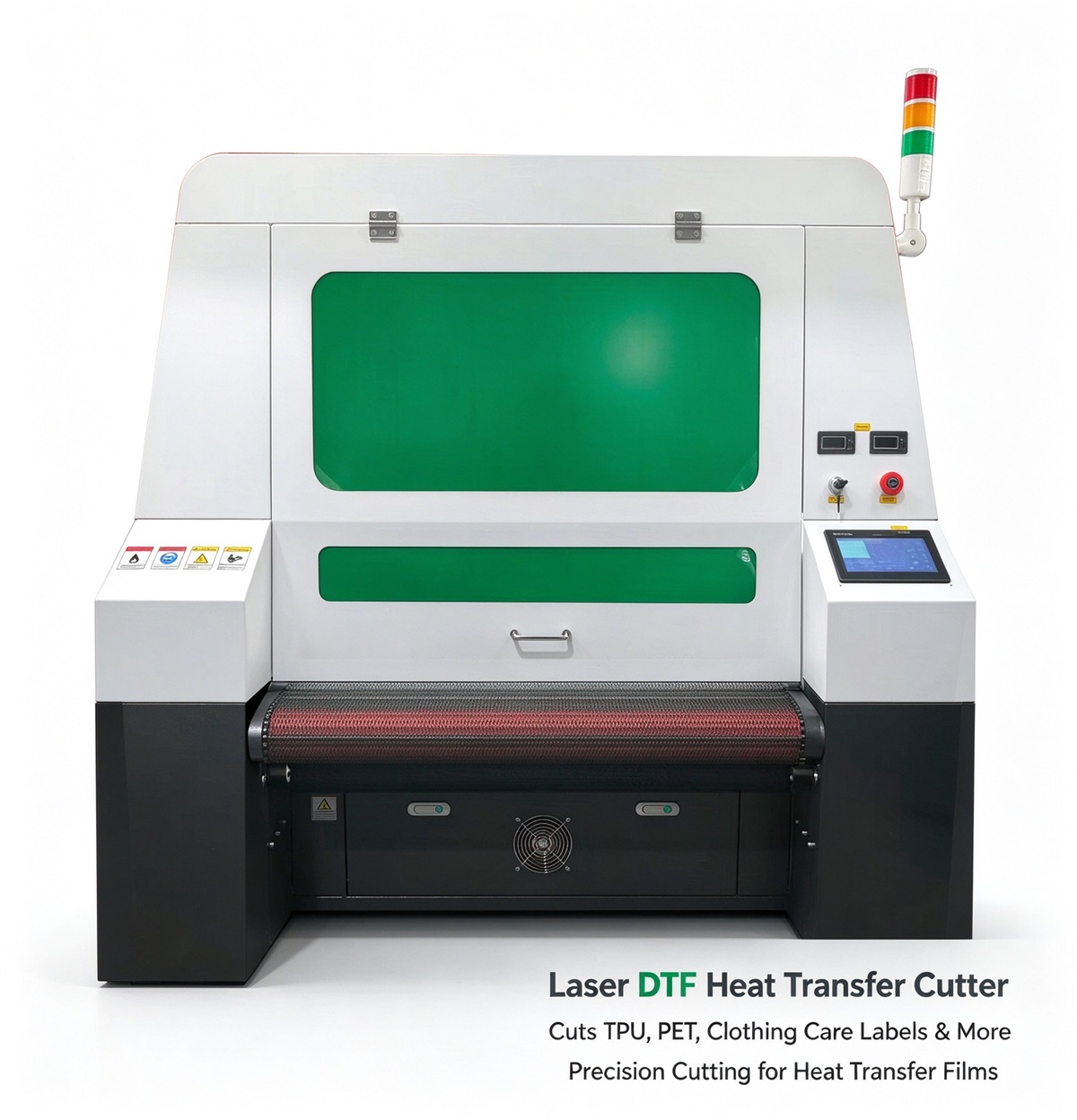
DTF heat transfer cutting is an important step in producing custom apparel, logos, labels, and promotional products. After printing designs onto PET film, manufacturers need to cut the transfer film into individual graphics or finished shapes before heat pressing them onto fabric.
Traditional methods can work well for simple jobs, but they may become inefficient when production involves intricate designs, high order volumes, or continuous roll processing. Alternatives such as laser cutting, digital knife cutting, plotter cutting, and automated vision cutting systems offer different advantages depending on the application.
This guide compares the best alternatives to conventional DTF heat transfer cutting and explains how to choose the right solution for your production needs.
1. Laser Cutting: A Flexible Solution for DTF Transfer Film
Laser cutting is an increasingly practical option for processing printed transfer films and other thin flexible materials. A CO2 laser cutting machine uses a focused beam to follow digital cutting paths, allowing manufacturers to process complex outlines without physical cutting dies.
For DTF production, laser cutting can help automate the separation of printed designs, especially when dealing with intricate shapes, multiple designs, or continuous rolls of transfer film.
One major advantage is that the cutting pattern can be changed through software. Manufacturers do not need to produce a new physical die whenever a design changes. With a suitable camera or vision system, the machine can also align cutting paths with printed graphics, depending on the configuration.
However, DTF film is usually made from PET, which is a thermoplastic material. Excessive laser energy can cause melting, edge deformation, smoke, or damage to the printed ink and adhesive powder. Laser compatibility must therefore be verified with the actual film, ink, and adhesive combination before production.
Best for: Manufacturers seeking automated, precise cutting of compatible transfer films, particularly when processing complex outlines or multiple designs.
2. Digital Knife Cutting: A Reliable Non-Thermal Alternative
Digital knife cutting uses a mechanically driven blade to follow programmed cutting paths. Unlike traditional die cutting, it can switch between digital designs without requiring a dedicated physical die.
This method is useful for businesses that want flexible cutting while avoiding the thermal effects associated with laser processing.
A digital knife system can process a range of films, fabrics, paper-based materials, and other compatible substrates. Its performance depends on blade geometry, material thickness, cutting force, and the stability of the film during processing.
For DTF transfer film, the main challenge is controlling the cutting depth. The system must cut the intended layer without unnecessarily damaging the carrier film or cutting mat, depending on the production workflow.
Compared with laser cutting, knife cutting avoids laser-generated heat at the cutting edge. However, blades can wear, and extremely small details may be more difficult to reproduce consistently.
Best for: Businesses processing heat-sensitive materials or requiring flexible digital cutting without thermal effects.
3. Vinyl Cutter or Plotter Cutting: Best for Simple Designs
Vinyl cutters and plotter cutters use a small blade to follow vector paths. They are widely used for sign-making, adhesive vinyl, heat transfer vinyl, and certain custom graphics.
For DTF workflows, a plotter may be useful for specific cutting tasks, but it is not automatically a direct replacement for every DTF cutting application. The printed film’s registration requirements, adhesive layer, and carrier structure must be compatible with the cutting method.
Plotters are often attractive to small businesses because of their relatively simple operation and suitability for short production runs. They work well with straightforward outlines and uncomplicated designs.
However, manual loading and unloading can limit productivity. Cutting intricate graphics or handling long rolls at high volumes may require more advanced equipment and registration features.
Best for: Small workshops, simple graphics, low-volume production, and businesses already using plotter-based cutting workflows.
4. Traditional Die Cutting: Best for Repetitive Shapes
Traditional die cutting uses a custom-shaped metal die to cut materials through mechanical pressure. Once the die is prepared, the same shape can be reproduced repeatedly.
This method can be efficient for large orders involving identical shapes, such as standardized transfer labels, patches, and simple graphic components.
Its biggest disadvantage is limited flexibility. Each new shape may require a new die, and intricate patterns can increase tooling complexity. It is also less convenient for businesses processing many designs in small quantities.
For customized DTF transfers, where artwork and dimensions frequently change, digital cutting systems generally offer greater flexibility.
Best for: High-volume production of standardized shapes with minimal design changes.
5. Automated Vision Cutting: Best for Printed DTF Film
Automated vision cutting combines a camera or optical recognition system with a digital cutting mechanism. The system identifies printed registration marks or graphic features and adjusts the cutting path to match the artwork.
This is particularly useful when printed graphics are not positioned perfectly according to the original digital file. Small variations can occur during printing, feeding, or film movement.
Depending on the system, vision cutting can be integrated with a mechanical blade or a laser. The cutting technology determines how the material is processed, while the vision system helps establish alignment.
For DTF film manufacturers, a vision-equipped cutting machine can reduce manual positioning and improve consistency across multiple designs. Automatic feeding can further reduce operator intervention.
Before purchasing, confirm whether the machine supports the registration marks, film width, artwork layout, and cutting accuracy required by your workflow.
Best for: Production environments handling printed DTF film, multiple designs, and automated alignment requirements.
6. Comparing the Best DTF Heat Transfer Cutting Alternatives
| Cutting Method | Main Advantage | Main Limitation | Best Application |
|---|---|---|---|
| CO2 laser cutting | Flexible digital paths and intricate contours | Heat can affect PET film and printed layers | Compatible films and complex outlines |
| Digital knife cutting | No thermal cutting effects | Blade wear and cutting-depth control | Heat-sensitive materials |
| Plotter cutting | Simple operation for basic designs | Limited throughput in many setups | Small businesses and simple graphics |
| Traditional die cutting | Efficient for repetitive shapes | Custom tooling required | High-volume standardized production |
| Automated vision cutting | Aligns cutting paths with printed artwork | Higher system complexity and cost | Registered cutting of printed film |
These technologies are not mutually exclusive. A manufacturer may use a vision system with either laser or knife cutting, depending on the material and production requirements.
7. Laser Cutting vs. Knife Cutting for DTF Film
For manufacturers choosing between laser cutting and mechanical knife cutting, the most important question is how the cutting process affects the complete transfer film.
Laser cutting can follow complex outlines without blade contact, and it eliminates the need for a custom cutting die. However, PET film and the printed or adhesive layers may respond poorly to excessive heat. Sample testing is essential to determine whether the finished edges remain suitable for peeling and heat transfer.
Knife cutting avoids thermal damage at the cutting edge and can be preferable when the film must remain unaffected by heat. The trade-off is that blade pressure, cutting depth, and wear must be controlled.
The appropriate choice depends on the required outline, film construction, production speed, and acceptable edge quality. Neither method should be selected based on cutting speed alone.
For a production line handling printed DTF rolls, registration accuracy, feeding stability, and reliable separation of finished designs can be just as important as the cutting mechanism itself.
8. How to Choose the Right DTF Cutting Machine
Before investing in a DTF heat transfer cutting system, consider the following factors.
Material compatibility: Confirm that the machine can process your PET film, printed ink, adhesive layer, and any protective coatings without compromising transfer performance.
Cutting accuracy: Evaluate whether the machine can reproduce small details and follow printed graphics accurately. For registered cutting, check the vision system and registration method.
Production capacity: Consider the number of designs processed per hour, roll width, feeding speed, unloading requirements, and the amount of manual labor involved.
Automation: Automatic feeding, vision alignment, and organized collection of finished pieces can reduce handling time and improve workflow consistency.
Operating costs: Include blades or other consumables, maintenance, electricity, labor, software, and material waste. For laser systems, also account for extraction and filtration requirements.
Sample testing: Run actual printed DTF film through the machine. Inspect cut edges, film deformation, adhesive behavior, design alignment, peeling performance, and final transfer quality after heat pressing.
A machine that cuts quickly but damages the transfer material may create more waste than it saves.
9. Why Consider an Automated DTF Film Laser Cutting Machine?
For businesses processing a wide variety of transfer designs, an automated cutting system can help simplify production by combining digital pattern processing with more consistent material handling.
A CO2 laser-based solution may be worth evaluating when the material has been confirmed compatible with laser processing and the application benefits from contact-free cutting. Adding a suitable vision system can help align cutting paths with printed artwork, while automatic feeding can support roll-based production.
However, because DTF films are heat-sensitive, manufacturers should not assume that every PET transfer film can be laser cut successfully. Testing must establish whether the laser can achieve the required contour without excessive melting, smoke, or damage to the transfer layers.
When comparing equipment, request a sample demonstration using your own printed film and assess the complete workflow rather than just the machine’s advertised cutting speed.
Conclusion
The best alternative to conventional DTF heat transfer cutting depends on your materials, order volume, design complexity, and automation requirements.
-
Laser cutting is worth considering for intricate contours and flexible digital production when the film is laser-compatible.
-
Digital knife cutting is a strong alternative when avoiding thermal effects is a priority.
-
Plotter cutting suits simpler designs and smaller production operations.
-
Traditional die cutting can be efficient for large quantities of standardized shapes.
-
Automated vision cutting helps align cutting paths with printed graphics and can be integrated with laser or knife systems.
For growing DTF businesses, the goal should be to find a cutting solution that balances accuracy, throughput, material compatibility, and total production cost. Testing actual transfer film before purchasing equipment is the most reliable way to determine which technology fits your workflow.
Frequently Asked Questions
1. What is the best alternative to manual DTF film cutting?
Digital knife cutting and automated vision cutting are practical alternatives, depending on the film and workflow. Laser cutting may also be suitable when testing confirms that the film and printed layers can tolerate the process.
2. Can a CO2 laser cut DTF transfer film?
A CO2 laser can interact with PET film, but successful DTF cutting depends on the specific film, ink, adhesive layer, and laser settings. Excessive heat can melt or deform the film, so sample testing and appropriate fume extraction are essential.
3. Is laser cutting better than plotter cutting for DTF?
Laser cutting can offer greater flexibility for intricate digital paths and automated processing. Plotter cutting avoids laser-generated heat and may be more suitable for certain materials and simpler workflows. The better option depends on film compatibility, required accuracy, and production volume.
4. Can a vision system improve DTF cutting accuracy?
Yes. A properly configured vision system can detect registration marks or printed features and align the cutting path with the actual artwork. Performance depends on camera resolution, mark design, film stability, and software configuration.
5. What should I test before buying a DTF film cutting machine?
Test cutting accuracy, edge quality, film deformation, adhesive behavior, peeling, and the final heat-pressed result. Also evaluate feeding stability, production throughput, waste rate, and operator workload.
6. Is laser cutting suitable for all heat transfer films?
No. Different films, coatings, inks, and adhesives react differently to heat. Verify material safety and conduct controlled sample tests before using a laser cutting system in production.
Post time: Oct-10-2026
