
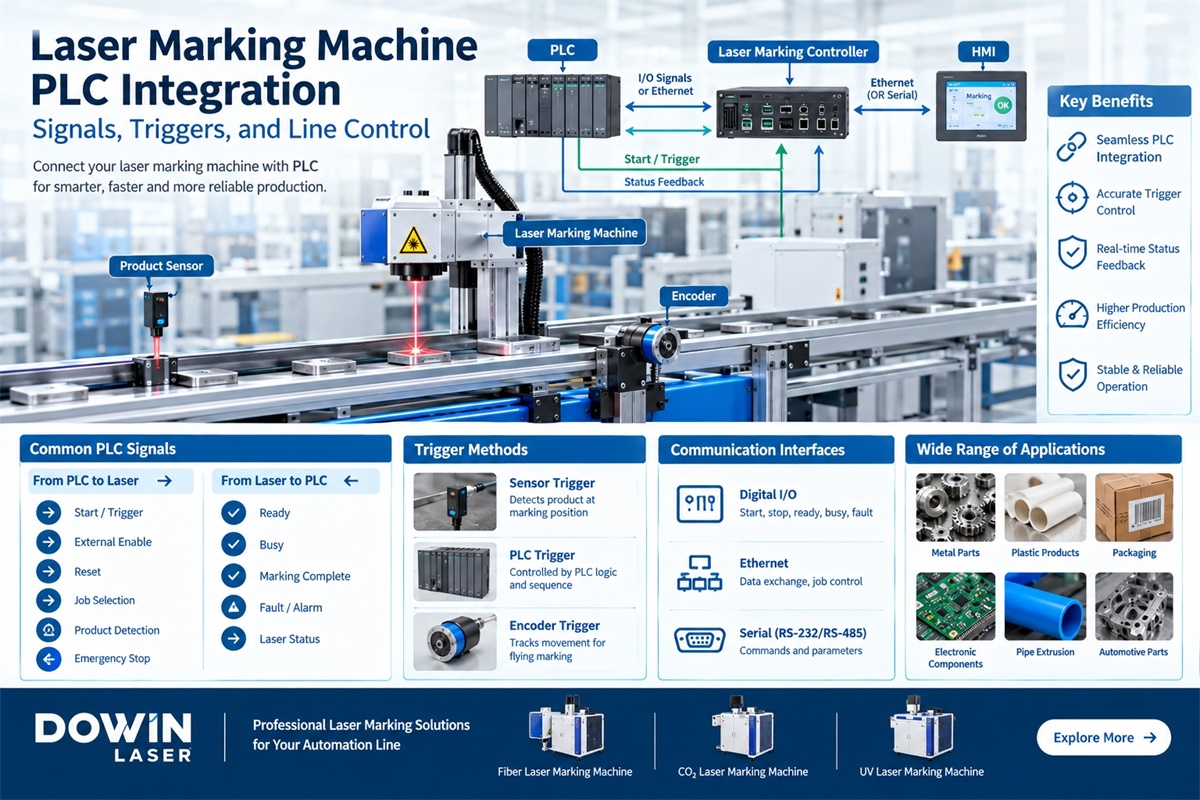
In modern manufacturing, a laser marking machine is often expected to do more than mark products. It must communicate with the factory’s automation system, respond to production signals, and operate in coordination with conveyors, robotic systems, sensors, and other equipment.
This is where PLC integration becomes important.
A properly integrated laser marking machine can receive external start commands, select marking programs, synchronize with product movement, and return operating-status signals to the production line. These functions help manufacturers build a more consistent and automated marking process.
Whether the application involves metal components, plastic products, electronic parts, packaging, or industrial assemblies, understanding the connection between a PLC and a laser marking system is essential before purchasing equipment.
This guide explains the main integration methods, signal types, triggering options, communication interfaces, and practical considerations for industrial applications.
1. What Is PLC Integration in a Laser Marking Machine?
A PLC (Programmable Logic Controller) is an industrial control device that manages the operation of automated equipment.
When a laser marking machine is integrated with a PLC, the two systems exchange signals or data to coordinate the marking process.
For example, a factory may require the following sequence:
-
A component arrives at the marking station.
-
A sensor detects the component.
-
The PLC confirms that the production line is ready.
-
The PLC sends a start command to the laser marking system.
-
The laser completes the marking operation.
-
The marking system returns a completion signal.
-
The PLC allows the component to move to the next station.
The laser marking machine performs the marking operation, while the PLC manages the wider production sequence.
This distinction is important. PLC integration does not necessarily mean that the PLC directly controls the laser source or marking parameters. In most configurations, the laser marking controller manages the marking process, while the PLC coordinates external equipment and operating conditions.
2. How Does a PLC Communicate with a Laser Marking Machine?
The communication method depends on the laser controller, PLC model, and automation requirements.
There are three common integration approaches.
Digital I/O Communication
Digital input and output signals are widely used for basic machine control.
A PLC can send a start signal to the laser marking controller. The laser system can then return signals indicating whether it is ready, busy, finished, or experiencing a fault.
This method is suitable for applications that require straightforward machine coordination without complex data exchange.
Typical functions include:
-
External start and stop commands
-
Marking enable signals
-
Machine-ready feedback
-
Marking-complete feedback
-
Fault and alarm reporting
-
External job selection, if supported
Ethernet Communication
Ethernet-based communication can support more advanced data exchange between the PLC and laser marking system.
Depending on the controller, it may be used for:
-
Sending variable marking content
-
Selecting marking programs
-
Transmitting production information
-
Reading machine status
-
Connecting with a factory automation network
However, having an Ethernet port does not automatically mean that a machine supports every industrial communication protocol.
Before purchasing, confirm whether the laser controller supports the protocol required by the factory, such as Modbus TCP or another specified interface.
Serial Communication
Some industrial systems use serial interfaces such as RS-232 or RS-485 to exchange commands and data.
This can be suitable for relatively simple communication requirements, especially when the PLC and laser controller both support the same protocol and data format.
The available commands, transmission settings, and communication logic must be confirmed before integration.
3. Common PLC Signals for Laser Marking Systems
A reliable integration project starts with a clear signal list.
The signals can generally be divided into two groups: commands sent from the PLC to the laser system, and status feedback sent from the laser system to the PLC.
Signals from PLC to Laser Marking Machine
| Signal | Purpose |
|---|---|
| Start / Trigger | Requests the laser to begin a marking cycle |
| External Enable | Allows or prevents marking operation |
| Reset | Requests fault or sequence reset, if supported |
| Job Selection | Selects a predefined marking program |
| Product Detection | Indicates that a product has reached the marking position |
| Emergency Stop | Activates the machine’s safety-stop function through the approved safety circuit |
Signals from Laser Marking Machine to PLC
| Signal | Purpose |
|---|---|
| Ready | Indicates that the marking system is available |
| Busy | Indicates that a marking operation is in progress |
| Marking Complete | Indicates that the current marking cycle has finished |
| Fault / Alarm | Reports an abnormal operating condition |
| Laser Status | Provides information about the laser system’s operating state |
Not every machine provides all these signals as standard. Some functions may require optional I/O modules, controller configuration, or additional electrical components.
It is also important to distinguish between ordinary control signals and safety-rated signals. Emergency-stop functions should be designed according to the machine’s safety architecture, rather than relying on an ordinary software command alone.
4. Laser Marking Trigger Methods: PLC, Sensor, and Encoder
The trigger method determines when the laser starts marking. The right choice depends on product movement, positioning accuracy, and production speed.
PLC Triggering
In PLC-triggered marking, the PLC sends a start command after checking the production conditions.
For example, a robotic system may place a metal component into a fixture. Once the fixture is confirmed to be in position and the robot has moved to a safe location, the PLC sends the marking command.
This approach is useful for:
-
Automated assembly lines
-
Robotic loading and unloading
-
Metal component manufacturing
-
Multi-station production systems
-
Applications with several interdependent machines
The PLC can also select a marking program based on the product model, provided that the laser controller supports external job selection.
Sensor Triggering
A photoelectric sensor detects a product when it reaches the marking station.
The sensor signal can be connected to the PLC or directly to a compatible marking controller.
Sensor triggering is suitable when products pass through a predictable marking position and each product requires a marking operation.
The sensor position, response time, product spacing, and marking delay must be considered to avoid incorrect marking positions or missed products.
Encoder-Based Triggering
An encoder measures the movement of a conveyor or continuously moving product.
The marking controller uses encoder feedback to coordinate the marking process with actual product movement.
This is particularly useful for:
-
Packaging and bottling lines
-
Plastic extrusion
-
Continuous material processing
-
Moving metal products
-
High-speed production lines
For applications where products cannot stop during marking, encoder-based synchronization can be more suitable than relying on a simple start signal.
The encoder resolution, signal frequency, direction, and scaling settings should be matched to the marking controller and production-line speed.
5. How PLC Integration Works in Different Production Applications
PLC integration is not limited to one industry. The same basic control principles can be adapted to different manufacturing processes.
Metal Parts and Automotive Components
Automotive and machinery manufacturers often need to mark serial numbers, part numbers, logos, production codes, and traceability information on metal components.
A typical automated process may involve:
-
A robotic arm loading a component into a fixture
-
A position sensor confirming that the component is correctly placed
-
The PLC selecting the corresponding marking program
-
The laser marking machine completing the identification mark
-
A completion signal allowing the robot to unload the component
Fiber laser marking machines are commonly considered for metals such as stainless steel, aluminum, copper, and other alloys. The required marking appearance and depth should be verified through sample testing.
Plastic Products and Pipe Manufacturing
Plastic products may require manufacturer information, specifications, batch numbers, production dates, and identification codes.
The PLC can coordinate product detection, extrusion speed, and marking authorization.
Depending on the plastic formulation and required marking quality, manufacturers may evaluate fiber, CO2, or UV laser systems. The correct choice should be based on the actual material and test results rather than the material name alone.
Packaging and Bottling Lines
Packaging manufacturers frequently need to mark production dates, batch numbers, QR codes, and product information.
A PLC can coordinate the marking process with filling, labeling, packaging, and conveyor equipment.
For products moving continuously, a flying laser marking system with suitable sensor and encoder feedback can mark products without requiring the entire line to stop.
Electronic Components and Electrical Products
Electronic manufacturing often requires fine identification marks on circuit boards, plastic housings, connectors, and other components.
A PLC can coordinate the marking station with assembly equipment, inspection systems, and product-tracking processes.
UV laser marking is worth evaluating for applications that require fine details or reduced thermal impact. Actual compatibility depends on the component material, surface treatment, and required marking result.
Industrial Packaging and General Manufacturing
Other applications include household products, building materials, tools, hardware, and consumer goods.
The PLC may control product positioning, marking authorization, job selection, and downstream inspection.
For mixed-product production lines, program selection and variable-data exchange can be especially important.
6. PLC Integration for Fixed Marking and Flying Marking
One important decision is whether products stop during marking or continue moving.
| Item | Fixed-Position Marking | Flying Laser Marking |
|---|---|---|
| Product movement | Product stops at marking station | Product moves during marking |
| Trigger method | PLC or sensor trigger | Sensor and encoder feedback are commonly used |
| Position control | Fixture or positioning system | Motion tracking and synchronization |
| Typical applications | Metal parts, components, assembled products | Packaging, pipes, cables, continuous products |
| Main integration concern | Position confirmation and cycle timing | Line speed, encoder scaling, and synchronization |
For fixed-position marking, the PLC usually needs to confirm that the product is correctly positioned before starting the marking cycle.
For flying marking, the system must account for product movement. A trigger signal alone may not be enough to maintain consistent marking placement at different production speeds.
The selection should therefore be based on the actual production process, not simply the maximum marking speed advertised for the laser machine.
7. Variable Data and Automatic Marking Program Selection
Many automated production lines need to mark different information on different products.
Examples include:
-
Serial numbers
-
Production dates
-
Batch numbers
-
Product models
-
QR codes
-
Barcodes
-
Customer-specific identification information
There are two common ways to manage this requirement.
Predefined job selection
Different marking programs are stored in the laser marking software. The PLC sends a job number or selection signal to call the correct program.
This is useful when the production line manufactures a limited number of product models.
External variable-data transmission
The PLC or a connected computer system sends changing information to the marking software before each marking cycle.
This is useful when every product requires a unique serial number, tracking code, or production record.
Before selecting a machine, confirm whether its software supports the required external data interface, job selection method, and data format. Do not assume that every controller can receive variable data directly from a PLC.
8. What Should Be Confirmed Before Purchasing a PLC-Compatible Laser Marker?
A machine that works independently may still require additional configuration to integrate with an existing automation system.
Before placing an order, prepare the following information.
1. PLC brand and model
Provide the exact PLC model and, if possible, the communication module being used.
2. Required communication interface
Confirm whether the system needs digital I/O, Ethernet, serial communication, or a combination.
3. Signal list
Prepare the required input and output signals, including start, ready, busy, complete, fault, and job selection.
4. Production speed
Provide the normal operating speed, maximum speed, and product spacing. These values are important for trigger timing and flying marking.
5. Product positioning
Explain whether products stop at the marking station, move continuously, or are positioned by a robot or fixture.
6. Marking content
Specify whether the machine marks fixed information or changing data such as serial numbers and production codes.
7. Integration responsibilities
Confirm who will handle electrical wiring, PLC programming, laser software configuration, communication testing, and on-site commissioning.
A useful way to avoid integration problems is to exchange the PLC model, I/O list, wiring diagram, and marking requirements with the laser supplier before equipment production.
9. Choosing a Dowin Laser Marking Machine for Automation Integration
The laser source should be selected according to the material and marking requirements. PLC integration is a separate consideration that must be confirmed for the specific machine configuration.
Dowin offers several types of industrial laser marking machines. You can review the Dowin Laser Marking Machine Collection to compare available models and configurations.
The main options include:
-
Fiber laser marking machines: Commonly used for metal components, tools, hardware, and industrial identification.
-
CO2 laser marking machines: Suitable for many non-metal materials, including selected plastics, wood, paper, and packaging materials.
-
UV laser marking machines: Worth considering for fine marking on selected plastics, electronic components, and other applications requiring reduced thermal impact.
-
Flying laser marking systems: Designed for production lines where products move during marking and synchronization is required.
When evaluating a Dowin machine for PLC integration, confirm the following details with the supplier:
-
Available digital input and output signals
-
Supported external trigger modes
-
Encoder input and flying-marking capability, if required
-
Available communication interfaces and protocols
-
External job selection and variable-data capabilities
-
Electrical specifications and integration requirements
The exact interfaces and functions depend on the selected model and configuration. They should be confirmed before ordering rather than assumed to be standard across the entire product range.
10. Common PLC Integration Problems and How to Avoid Them
| Problem | Possible Cause | What to Check |
|---|---|---|
| Laser does not start | Missing trigger or enable signal | Check PLC output, wiring, and controller input status |
| Marking starts too early or too late | Incorrect sensor position or trigger delay | Adjust sensor placement and timing |
| PLC does not receive completion feedback | Incorrect signal mapping | Check output configuration and electrical connections |
| Wrong marking program is selected | Incorrect job-selection logic | Verify PLC program numbers and laser job mapping |
| Marking position changes on moving products | Encoder scaling or synchronization error | Check encoder resolution and controller settings |
| Variable data is incorrect | Communication or data-format mismatch | Verify transmission format and update sequence |
| Production line stops unexpectedly | Alarm or handshake timeout | Review fault logic and PLC sequence |
A practical troubleshooting method is to monitor the PLC input/output states and laser controller status at the same time.
This helps identify whether a problem originates from the PLC program, electrical wiring, sensor, encoder, communication interface, or laser marking software.
11. FAQ: Laser Marking Machine PLC Integration
Q1: Can a laser marking machine connect to an existing factory PLC?
Yes, provided that the laser marking controller offers compatible interfaces and supports the required control functions. The PLC model and interface requirements should be checked before purchase.
Q2: Does PLC integration require special laser marking software?
It depends on the application. Basic start and completion control may only require compatible I/O functions. External job selection, variable-data transmission, or advanced communication may require specific software features or optional modules.
Q3: Can a PLC control the marking content?
A PLC can select predefined marking programs or send variable data when the laser controller and software support these functions. The exact method depends on the system configuration.
Q4: Is an encoder required for PLC-integrated laser marking?
No. An encoder is not normally necessary for products that stop at a fixed marking position. It is commonly used when the product moves continuously and the marking process must follow its movement.
Q5: Can one PLC control multiple laser marking machines?
This is possible in a properly designed automation system. The PLC must manage the individual machine signals, job assignments, operating sequences, and fault conditions. The communication capacity and control architecture should be evaluated in advance.
Q6: What documents should a laser supplier provide for PLC integration?
Useful documents include an electrical wiring diagram, I/O signal list, interface specifications, communication protocol details, and instructions for external triggering and job selection. The exact documentation depends on the machine configuration.
Conclusion
PLC integration turns a laser marking machine from an independent processing device into part of a coordinated manufacturing system.
The key is to establish reliable communication between the PLC and laser controller, define clear input and output signals, select the correct trigger method, and ensure that marking operations match the production sequence.
For fixed-position applications, PLC or sensor triggering may be sufficient. For continuously moving products, encoder-based synchronization may be necessary. When variable marking content is involved, external job selection or data communication must also be considered.
Before purchasing a laser marking machine, define your PLC model, production process, marking requirements, and communication expectations. This gives the supplier the information needed to recommend a suitable laser configuration and prepare for a smoother integration process.
Post time: Oct-30-2026
