
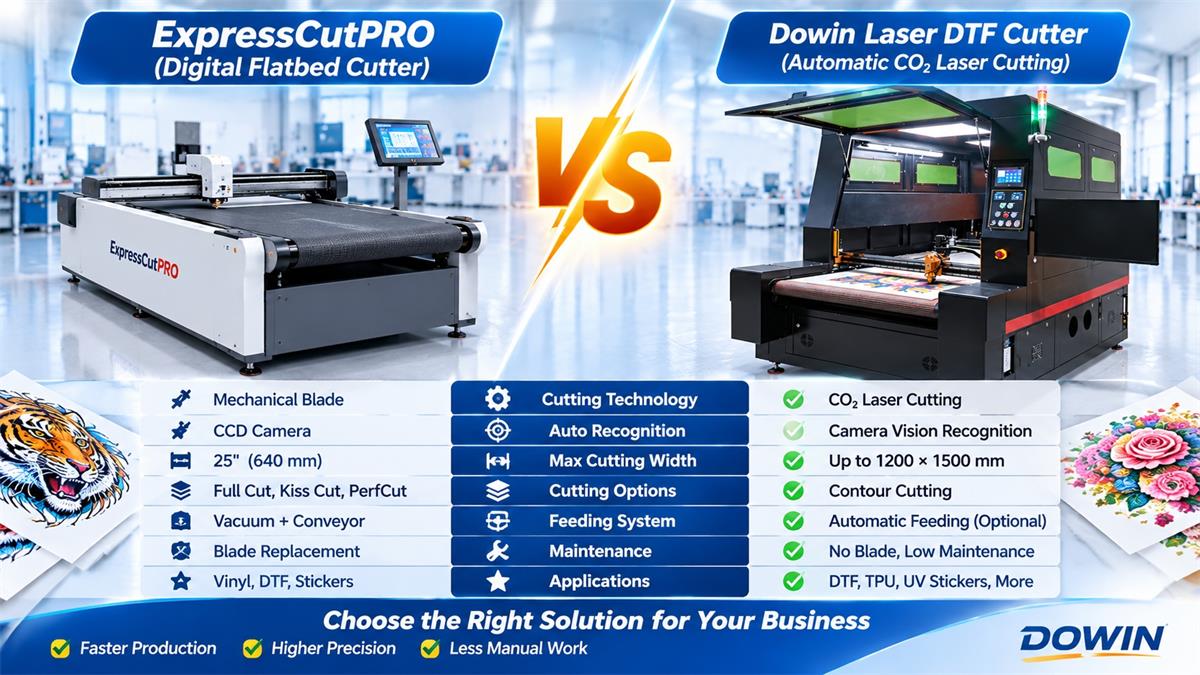
For commercial DTF printing businesses, cutting printed transfer film efficiently is just as important as printing it. As customer orders increase, manually separating individual designs becomes time-consuming, labor-intensive, and difficult to manage consistently.
The ExpressCutPRO Digital Flatbed Cutter is designed to automate this process using a CCD camera, mechanical cutting blade, vacuum suction, and conveyor feeding system. It can recognize registration marks and QR codes, then cut printed DTF graphics automatically.
However, mechanical blade cutting is not the only way to automate DTF film processing. Dowin offers another solution based on automatic vision recognition and CO2 laser cutting technology.
Its 9070 Automatic DTF Laser Cutter, 9070 Enclosed DTF Cutter, and 1215 Large-Format DTF Cutting Machine are designed for businesses that need automatic contour recognition, non-contact cutting, and flexible film processing.
In this article, we compare ExpressCutPRO with Dowin automatic laser cutting systems and explain which technology may be more suitable for different commercial production requirements.
1. What Is ExpressCutPRO?
ExpressCutPRO is a digital flatbed conveyor cutter developed for DTF transfers, UV DTF stickers, vinyl, sublimation transfers, and other flexible materials.
Unlike a conventional manual cutting plotter, it combines automatic material feeding, camera recognition, and digital cutting control to reduce repetitive operator work.
Its main features include:
- Maximum media width of approximately 25 inches (640 mm).
- Conveyor belt for automatic roll material feeding.
- CCD camera for registration mark and QR code recognition.
- Vacuum suction to hold material during cutting.
- Servo motor drive for X and Y axis movement.
- Single tool holder supporting blade and plotter pen operations.
- Full-cut, kiss-cut, and PerfCut capabilities.
- 7-inch touchscreen control panel.
- WiFi, Ethernet, and USB connectivity.
- Compatibility with different RIP and design workflows.
One of ExpressCutPRO’s advertised performance specifications is processing a 24 × 34.5-inch area in approximately 30–60 seconds. Its maximum cutting speed is listed at 700 mm/s, although actual production speed depends on artwork, material, and cutting settings.
The machine is designed for print shops that want to automate the separation of printed graphics without manually cutting each transfer.
2. What Problems Does ExpressCutPRO Help Solve?
To understand the value of an automatic DTF cutter, it is important to look at the problems it addresses in everyday production.
Reducing Manual Cutting Work
When a DTF printing shop receives hundreds of customized designs, manually separating each transfer requires considerable time and labor.
ExpressCutPRO automates the cutting process through its conveyor feeding and digital cutting system. Operators no longer need to manually guide a cutting blade around every printed graphic.
Recognizing Printed Graphics Automatically
Different DTF designs can be printed together on the same film. Without accurate positioning, the cutting path may not match the printed artwork.
ExpressCutPRO uses a CCD camera to recognize registration marks and QR codes. It can identify the corresponding cutting profile and process different designs according to the supplied cutting data.
Supporting Different Cutting Requirements
Commercial print shops produce more than ordinary rectangular transfers. They may need to process customized logos, lettering, stickers, and different graphic shapes.
Its blade-based cutting system supports different operations, including full cutting, kiss cutting, and perforation-style cutting.
Improving Production Workflow
The integrated conveyor system helps feed printed material automatically. Combined with its camera and software integration, this reduces repeated manual handling and makes the finishing process more organized.
These features make ExpressCutPRO a competitive mechanical cutting solution for businesses producing DTF and other printed film products.
3. ExpressCutPRO vs. Dowin Automatic DTF Laser Cutting Machine
Both ExpressCutPRO and Dowin offer automated solutions for printed film cutting. However, their core technologies are different.
ExpressCutPRO uses a mechanical blade, while Dowin uses a focused CO2 laser beam. This difference affects the cutting process, tool maintenance, material handling, and suitable applications.
| Comparison | ExpressCutPRO | Dowin DTF Laser Cutter |
|---|---|---|
| Cutting technology | Mechanical blade | CO2 laser |
| Positioning system | CCD camera | Camera / industrial CCD vision system, depending on model |
| Material feeding | Conveyor belt automatic feeding | Automatic feeding configurations available |
| Material holding | Vacuum suction | Machine-specific platform and feeding configuration |
| Maximum media width | Approximately 640 mm | Depends on the selected model |
| Large-format option | 25 inches wide, unlimited roll length | 1215: 1200 × 1500 mm working area |
| Cutting operations | Full cut, kiss cut, PerfCut | Laser contour cutting and configured kiss/through cutting |
| Cutting tool | Mechanical blade | Focused laser beam |
| Blade replacement | Required | No mechanical cutting blade |
| Thermal effect | No laser-related thermal effect | Thermal processing; film compatibility testing required |
| Additional applications | Vinyl, HTV, stickers, sublimation and other compatible materials | DTF, TPU, UV stickers, crystal labels and other compatible materials |
The important point is that both machines already offer automatic recognition and feeding. Therefore, the comparison should not be based on automation alone.
The real difference is how the material is cut. ExpressCutPRO relies on physical blade contact, while Dowin uses non-contact laser processing. Each method has its own advantages depending on the finished product and material requirements.
4. Mechanical Blade Cutting vs. CO2 Laser Cutting: Which Is Better for DTF Film?
Mechanical Blade Cutting
Mechanical cutting is a familiar technology in the sign-making, vinyl, and printing industries. A blade follows a programmed cutting path to separate the printed material.
Its advantages include:
- No heat generated by laser processing.
- Suitable for full-cut and kiss-cut applications.
- Can perform specialized operations such as perforation cutting.
- Suitable for different compatible vinyl and film materials.
- Vacuum suction helps stabilize flat materials during processing.
However, the cutting blade is a consumable component. Its condition can affect cutting quality, and operators need to monitor blade wear and cutting pressure.
For some materials and cutting tasks, blade-based systems remain a practical choice.
CO2 Laser Cutting
CO2 laser cutting uses a focused beam to cut compatible films without physical contact. The cutting path is controlled digitally, allowing the machine to process customized graphics without mechanical blade pressure.
Its advantages include:
- Non-contact cutting without direct blade pressure.
- No mechanical cutting blade to replace.
- Digital contour cutting for customized designs.
- Flexible cutting paths for different graphic shapes.
- Suitable for compatible PET, TPU, UV sticker, and label materials.
Another important benefit is that changing the digital cutting design does not require replacing a physical cutting die or changing the blade for each graphic shape.
However, laser cutting is a thermal process. Some films may melt, deform, discolor, or release hazardous fumes. Material testing and appropriate exhaust arrangements are essential before production.
What About Cutting Speed?
ExpressCutPRO advertises a processing time of approximately 30–60 seconds for a 24 × 34.5-inch area. This provides a useful reference for evaluating its production capacity.
Dowin laser cutting machines are designed to combine automatic visual recognition, digital contour processing, and automatic feeding. Their actual output depends on cutting complexity, laser power, film characteristics, feeding speed, and machine configuration.
It would not be accurate to claim that every laser cutter is faster than ExpressCutPRO under all conditions. Buyers should compare both systems using the same printed film, artwork, and production requirements.
For commercial factories, the most useful measurement is not simply the maximum cutting speed. It is the number of finished, usable transfers produced per hour with acceptable cutting quality.
5. Why Consider Dowin Automatic Vision Recognition Laser Cutting?
For DTF manufacturers handling customized orders, the ability to recognize printed graphics and automatically follow their cutting outlines is extremely important.
Dowin combines camera recognition with CO2 laser cutting to automate this finishing process.
Automatic Recognition of Printed Contours
After DTF printing, the vision system identifies the relevant printed contours or registration information. The laser then follows the configured cutting path.
This is particularly useful for different logos, lettering, irregular shapes, and customized transfer graphics.
Non-Contact Processing
Because the laser does not physically press against the film, there is no mechanical blade pressure during cutting.
This is useful when processing flexible materials where physical blade contact may cause unwanted movement or require additional material stabilization.
Flexible Digital Cutting
Different customers may submit completely different artwork. One order may contain small logos, while another requires large graphics or complicated outlines.
Digital cutting paths allow the machine to change between different designs through the software workflow without requiring a physical cutting die for each design.
More Material Applications
Beyond DTF PET transfer film, Dowin’s laser cutting solutions are designed for compatible TPU materials, UV stickers, crystal labels, wash labels, and garment decorations.
This can be valuable for print shops that want to expand into additional customized transfer and label products.
6. Which Dowin Automatic DTF Cutter Should You Choose?
Dowin offers different configurations to meet the requirements of growing printing businesses and larger industrial manufacturers.
Dowin 9070 Automatic DTF Laser Cutter
The Dowin 9070 Automatic DTF Laser Cutter is an open-structure laser cutting solution designed for automatic DTF film contour cutting.
Its main features include:
- CO2 laser cutting technology.
- Automatic camera registration and contour recognition.
- Automatic feeding and unloading configurations.
- Processing of compatible PET and TPU films.
- Digital cutting paths for customized transfer designs.
For commercial print shops that want to automate DTF film contour cutting while maintaining a more accessible machine structure, the 9070 is worth considering.
Dowin 9070 Enclosed DTF Film Cutter
The Dowin 9070 Enclosed DTF Cutter features a fully enclosed laser working area.
Its main characteristics include:
- Fully enclosed laser safety cover.
- LED lighting and camera visibility.
- DTF PET film and compatible TPU cutting.
- UV sticker and crystal label applications.
- Wash label, collar label, and garment decoration processing.
This model is particularly suitable for factories that prefer an enclosed laser working environment and need a more controlled machine layout.
Dowin 1215 Large-Format DTF Laser Cutting Machine
For businesses with larger production requirements, the Dowin 1215 DTF and TPU Film Cutting Machine offers a larger working area and dual laser head configuration.
Its main specifications include:
- 1200 × 1500 mm working area.
- Dual 160W laser heads.
- Intelligent automatic feeding system.
- Industrial CCD camera positioning.
- Servo motor, reducer, rack-and-pinion transmission.
- Linear guide rail system.
The larger working area provides more flexibility for processing different film formats and arranging multiple designs. The dual-head configuration is intended for manufacturers seeking higher processing capacity.
Compared with a 25-inch-class cutting system, the 1215 offers a substantially larger processing format. However, actual output still depends on the material, artwork, and production settings.
7. How to Select an Automatic DTF Film Cutting System
Before purchasing an automatic cutter, commercial print shops should consider more than the machine’s advertised speed.
1. Check Your Daily Production Volume
Calculate how much printed film you process every day and how many employees currently handle cutting and separation.
If manual trimming is delaying orders, automatic cutting may help remove a significant production bottleneck.
2. Compare Cutting Accuracy
Ask suppliers to demonstrate how their machines recognize registration marks and follow irregular graphic contours.
Test small lettering, detailed logos, and different artwork layouts rather than evaluating only simple rectangular designs.
3. Evaluate the Actual Cutting Method
If you require full cutting, kiss cutting, or perforation, check whether the machine supports these operations with the appropriate tools and settings.
If you need non-contact contour cutting, investigate the laser system’s material compatibility and cutting quality.
4. Confirm Material Compatibility
Not every DTF film behaves the same way. Film thickness, coating, adhesive layers, and release liner characteristics can influence cutting results.
For laser systems, always request a sample test using your actual PET or TPU film.
5. Consider Software and Workflow Integration
Check whether the cutting system can work with your existing RIP software, design files, and printing workflow.
QR code recognition, automatic job loading, and camera positioning can all help simplify production, but the actual software compatibility should be confirmed before purchasing.
8. Final Verdict: ExpressCutPRO or Dowin Automatic DTF Laser Cutter?
ExpressCutPRO is a capable digital flatbed conveyor cutter for DTF and other printed materials. Its CCD camera, QR code recognition, vacuum suction, servo motors, and automatic feeding make it a practical solution for businesses that need mechanical blade cutting.
Dowin offers a different approach through automatic vision recognition and CO2 laser cutting. The 9070 is designed for automatic DTF contour cutting, the 9070 Enclosed provides a fully enclosed working area, and the 1215 offers a larger processing format with dual 160W laser heads.
Here is a practical selection guide:
- For mechanical full-cut, kiss-cut, and PerfCut operations: Consider ExpressCutPRO.
- For open-structure automatic DTF laser contour cutting: Consider Dowin 9070.
- For enclosed laser processing: Consider Dowin 9070 Enclosed.
- For larger-format production with dual laser heads: Consider Dowin 1215.
The best machine is the one that matches your actual production process. If your main requirement is mechanical kiss cutting and perforation, a blade-based system may be more appropriate. If you want automatic visual recognition and non-contact laser contour cutting for compatible films, Dowin is an alternative worth evaluating.
Dowin provides DTF and TPU film laser cutting solutions for commercial printing businesses. Send us your film samples and cutting files to arrange a material test and find the right machine configuration for your production requirements.
Frequently Asked Questions
What is ExpressCutPRO used for?
ExpressCutPRO is a digital flatbed conveyor cutter used for DTF transfers, UV DTF stickers, sublimation transfers, vinyl, PET film, and other compatible materials. It uses a mechanical blade and CCD camera recognition.
Does ExpressCutPRO use a laser?
No. ExpressCutPRO uses a mechanical cutting blade. Its camera recognizes registration marks and QR codes to align the cutting process.
What is the maximum cutting width of ExpressCutPRO?
Its published maximum media width is approximately 25 inches (640 mm), with unlimited roll length when using the appropriate conveyor feeding configuration.
How fast is ExpressCutPRO?
Supply55 advertises a processing time of approximately 30–60 seconds for a 24 × 34.5-inch area. Actual production time depends on the cutting file and material.
What is the difference between ExpressCutPRO and a laser DTF cutter?
ExpressCutPRO uses a mechanical blade, while a laser DTF cutter uses a focused CO2 laser beam. Both can use camera recognition and automatic feeding, but their cutting methods and suitable finishing operations are different.
Can a Dowin laser cutter recognize printed DTF designs automatically?
Yes. Dowin’s automatic DTF laser cutting solutions use camera or CCD positioning technology to recognize printed contours and follow the configured cutting paths.
Can Dowin laser cutters process TPU and PET films?
Dowin offers DTF and TPU film cutting machines designed for compatible materials. Actual cutting quality depends on film composition, thickness, coatings, and laser parameters.
Does laser cutting require blade replacement?
No mechanical cutting blade is required. However, the laser source, optical components, exhaust system, and mechanical components still require regular inspection and maintenance.
Which is better for commercial DTF production?
For mechanical kiss cutting, full cutting, and perforation, ExpressCutPRO offers dedicated blade-based functions. For automatic visual contour recognition and non-contact cutting of compatible films, Dowin laser systems offer another production option. The best choice depends on your material and finished-product requirements.
Post time: Nov-09-2026
