
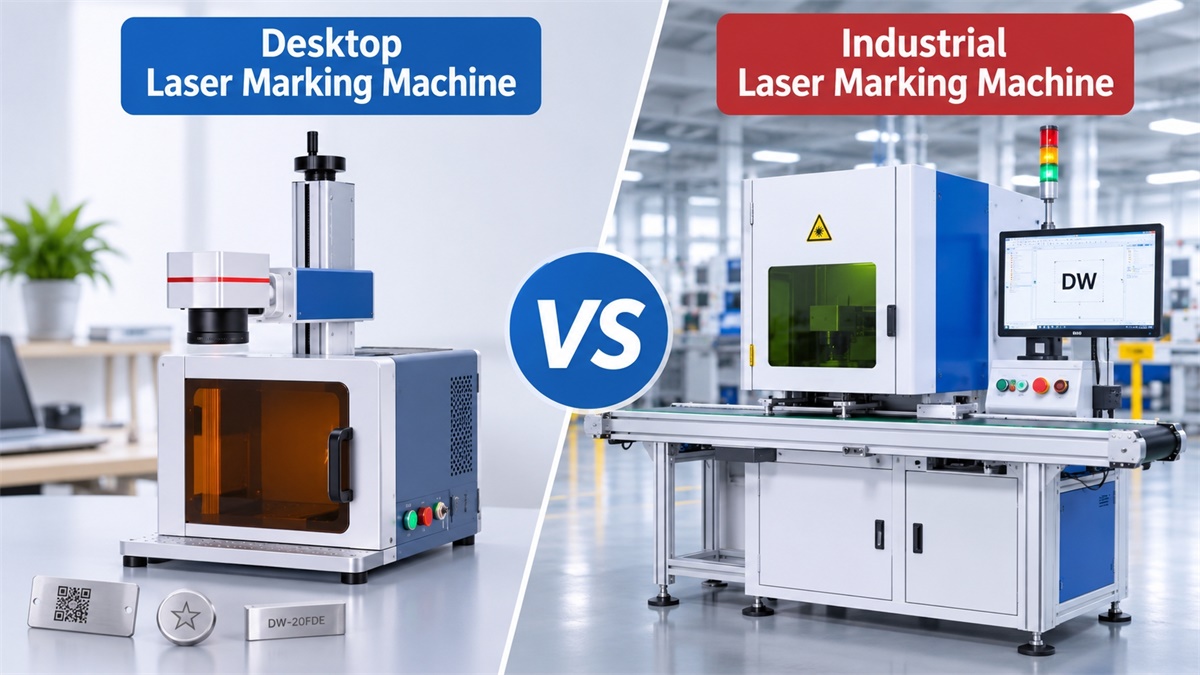
Choosing between a desktop and an industrial laser marking machine depends on your production volume, marking requirements, available workspace, and automation needs. A compact model such as the DW-20FDE desktop fiber laser marking machine is suitable for small workshops and flexible marking tasks, while manufacturers with different production requirements can explore Dowin’s industrial and other laser marking machine configurations.
Although both machine types use laser technology to create permanent marks, they are designed for different production environments. Understanding these differences helps buyers avoid paying for unnecessary capacity or choosing equipment that cannot keep up with actual production demands.
Desktop vs Industrial Laser Marking Machines: 6 Key Differences
1. Machine Size and Working Space
A desktop laser marking machine is designed to save workspace. Its compact structure makes it suitable for small workshops, laboratories, retail businesses, and production areas with limited floor space.
An industrial laser marking machine generally has a larger structure. Depending on its configuration, it may include a protective enclosure, conveyor system, automated loading equipment, or integration interfaces.
Typical applications:
-
Desktop: Small metal parts, jewelry, tools, nameplates, and customized products.
-
Industrial: Automotive components, electronic parts, hardware batches, packaging, and factory production.
[Cover image position: Desktop and industrial laser marking machines side by side]
2. Marking Speed and Production Capacity
The difference is not simply the laser’s advertised marking speed. Actual production capacity depends on marking content, material, product positioning, loading time, and operator handling.
A desktop machine can achieve high scanning speeds, but manual loading and unloading may limit overall output.
Industrial systems are designed to improve the complete production process. They can incorporate conveyors, automatic positioning, and triggering systems to reduce manual handling.
For businesses marking hundreds or thousands of components per shift, production workflow is often more important than the maximum scanning speed.
3. Laser Power and Marking Performance
Desktop machines commonly use 20W, 30W, or 50W fiber laser sources for standard metal marking applications.
Industrial machines offer more configuration options, including higher-power laser sources when deeper engraving, larger marking areas, or specific processing requirements demand them.
However, higher laser power does not automatically mean better marking quality.
The appropriate configuration depends on:
-
Material type and surface condition.
-
Required marking depth.
-
Desired contrast and readability.
-
Marking area and graphic complexity.
-
Production speed requirements.
For example, a 20W fiber laser may be sufficient for serial numbers and logos on stainless steel, while deeper engraving may require a higher-power configuration.
4. Automation and Production Line Integration
This is one of the most important differences.
A desktop machine usually operates as an independent marking workstation. Operators position products manually, start the marking process, and remove finished parts.
Industrial marking systems can be configured for:
-
Conveyor belt marking.
-
Automatic product detection.
-
PLC signal integration.
-
Encoder synchronization.
-
Online marking of moving products.
-
Automated production line operation.
[Body image position: Industrial laser marking machine integrated with a conveyor production line]
For manufacturers planning to automate their production processes, an industrial system offers greater flexibility.
5. Operating Environment and Safety
Desktop machines are often used in smaller workshops where equipment footprint and ease of operation are important.
Industrial systems are more likely to operate in demanding manufacturing environments, where equipment stability, protective enclosures, dust management, and integration with other machinery must be considered.
Both types require appropriate laser safety measures. An enclosed desktop machine, such as the DW-20FDE, can provide an additional physical safety barrier through its protective enclosure and door-interlock configuration.
6. Investment and Operating Costs
Desktop machines generally require a lower initial investment because of their compact structure and simpler configuration.
Industrial systems may involve additional costs for:
-
Higher-power laser sources.
-
Conveyor and automation equipment.
-
Protective enclosures.
-
PLC and production line integration.
-
Installation and commissioning.
However, comparing purchase prices alone can be misleading.
For a business with high production volumes, automation may reduce labor requirements and handling time. A more expensive industrial system may therefore offer better long-term production economics.
Desktop vs Industrial Laser Marking Machine: Comparison Table
|
Feature |
Desktop Machine |
Industrial Machine |
|---|---|---|
|
Structure |
Compact |
Larger, configurable |
|
Installation |
Simple |
May require integration |
|
Laser power |
Commonly 20–50W |
Multiple power options |
|
Working area |
Usually smaller |
Configurable |
|
Loading |
Mostly manual |
Manual or automated |
|
Production |
Small to medium batches |
Medium to high volumes |
|
Automation |
Limited or optional |
Extensive options |
|
Investment |
Generally lower |
Generally higher |
|
Main application |
Workshops and small businesses |
Manufacturing facilities |
Note: These are general market characteristics, not strict technical classifications. Industrial machines can also use low-power laser sources, and desktop machines can achieve high marking speeds.
Which Laser Marking Machine Should You Choose?
The right choice depends on your actual production requirements rather than whether a machine is labeled desktop or industrial.
Choose a desktop laser marking machine if:
-
You operate a small workshop or startup business.
-
Your production volume is relatively low.
-
You mainly mark individual products or small batches.
-
You need a compact, easy-to-operate machine.
-
You do not require production line automation.
Choose an industrial laser marking machine if:
-
You operate a manufacturing facility.
-
You need consistent output across large production batches.
-
You want to reduce manual loading and handling.
-
You need conveyor-based or online marking.
-
You plan to integrate laser marking with existing production equipment.
Dowin Laser Marking Machine Solutions
Dowin provides different laser marking configurations for workshops and industrial manufacturing applications.
For smaller businesses and general metal marking, the DW-20FDE desktop fiber laser marking machine is a practical option.
[Product image position: DW-20FDE desktop enclosed fiber laser marking machine]
Its main specifications include:
-
Laser power: 20W, optional 30W and 50W.
-
Laser source: Raycus.
-
Standard working area: 110 × 110 mm.
-
Optional working areas: 150 × 150 mm and 175 × 175 mm.
-
Cooling: Air cooling.
-
Maximum advertised marking speed: 7,000 mm/s.
For manufacturers requiring different marking configurations, working areas, or production line integration, explore the Dowin Laser Marking Machine Collection.
The best configuration should be selected according to the material, marking content, daily output, and automation requirements.
Frequently Asked Questions
1. Is a desktop laser marking machine suitable for industrial use?
Yes. A desktop machine can be used in industrial workshops for component identification, serial numbers, logos, and small-batch production. The main limitation is usually its production workflow rather than its marking capability.
2. Can a desktop fiber laser marking machine mark stainless steel?
Yes. Fiber laser marking machines are widely used for stainless steel, aluminum, brass, copper, and other metals. The final marking result depends on laser parameters and surface conditions.
3. Is an industrial laser marking machine always faster?
No. Maximum scanning speed does not represent actual production capacity. Automatic feeding, positioning, product handling, and marking cycle time all influence overall output.
4. Can a desktop laser marking machine be upgraded with a conveyor?
Some configurations can be adapted for automated feeding, but not every desktop machine is designed for conveyor integration. For continuous production, an industrial online marking configuration is generally more suitable.
5. What should I consider before purchasing a laser marking machine?
Evaluate five factors: marking material, required marking depth, working area, daily production volume, and automation requirements. Testing actual samples before purchasing is also recommended.
Final Recommendation
A desktop laser marking machine is a sensible choice for compact workspaces, flexible marking tasks, and small-batch production. An industrial laser marking system is more appropriate when production efficiency, automation, and continuous operation become priorities.
The best machine is not necessarily the one with the highest power or largest structure, but the one that matches your actual manufacturing process.
Post time: Nov-03-2026
