
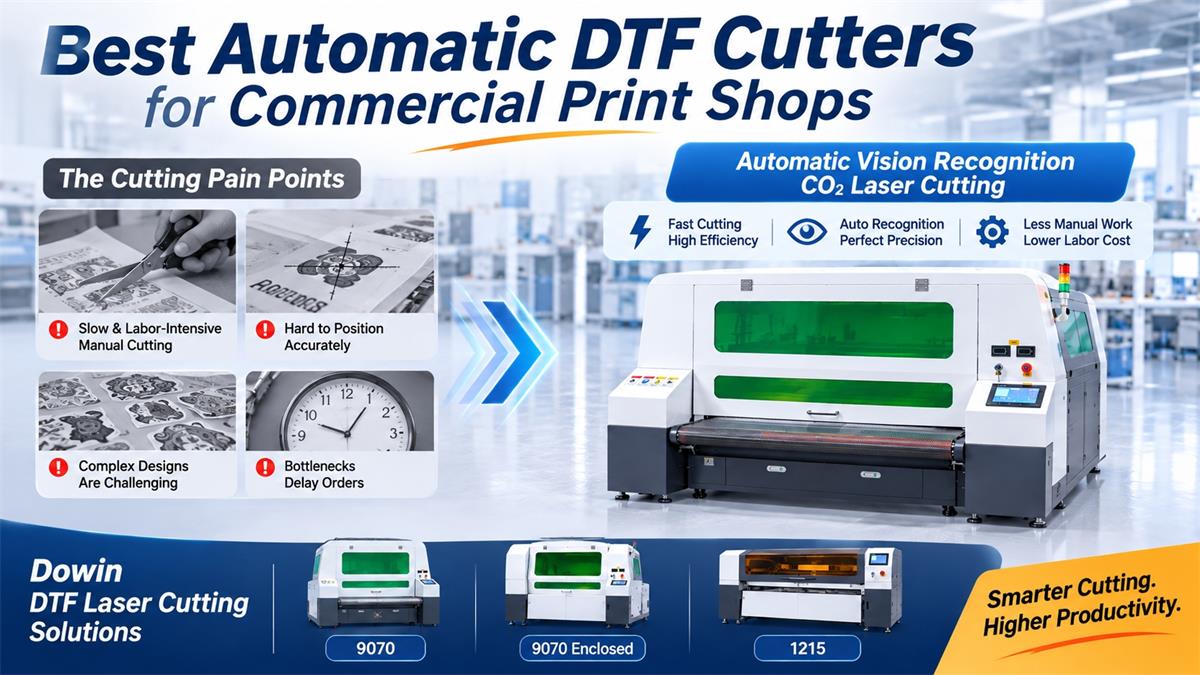
For commercial DTF printing shops, printing faster does not always mean delivering orders faster. Many businesses invest in high-speed DTF printers but still rely on manual cutting to separate printed transfers. As order volumes increase, scissors, manual positioning, and repetitive trimming can become serious production bottlenecks.
This is why choosing the right automatic DTF cutter is becoming increasingly important. A professional cutting solution should do more than simply cut film. It should recognize printed graphics, follow their contours accurately, process different designs efficiently, and keep the production workflow moving.
There are several types of automatic DTF cutting machines on the market, including blade cutters, flatbed cutters, and vision-based CO2 laser cutting systems. For commercial print shops handling customized orders and large volumes of transfer film, automatic laser contour cutting is an option worth considering.
1. Why DTF Cutting Becomes a Bottleneck in Commercial Print Shops
DTF printing technology has made it easier to produce customized garment transfers in small and large batches. However, once printing and curing are completed, the finished film still needs to be separated into individual designs.
This seemingly simple process creates several problems as production grows.
Manual Cutting Takes Too Much Time
When a shop receives hundreds of transfer designs in one order, operators may spend hours cutting and separating printed film. Even if the printer finishes a job quickly, the cutting department can delay the entire order.
Manual trimming also requires continuous employee attention. Workers must repeatedly position the film, follow the artwork boundaries, cut individual designs, and organize the finished transfers.
The result is a production process that depends heavily on labor instead of equipment automation.
Different Designs Make Cutting More Difficult
Commercial DTF orders rarely contain only simple rectangular graphics. Customers often submit logos, lettering, irregular shapes, small graphics, and complicated artwork arranged together on gang sheets.
Following every outline manually is time-consuming. Small deviations can leave uneven borders, damage artwork, or create inconsistent finished products.
As the number of designs increases, maintaining consistent cutting quality becomes more difficult.
Positioning Errors Cause Material Waste
Printed film can shift, stretch, or become misaligned during handling. If the cutting position does not match the printed artwork, the blade or cutting head may follow an incorrect path.
This can result in misplaced cuts, damaged transfers, and additional manual inspection. For businesses processing expensive custom orders, repeated cutting mistakes also increase material waste.
Labor Costs Increase with Production Volume
Adding more DTF printers often means producing more finished film, but it does not automatically solve the cutting problem.
Without an automated cutting process, businesses may need additional employees to handle trimming, sorting, and material preparation. This increases labor expenses and makes production capacity more dependent on staffing.
Printing and Cutting Speeds Do Not Match
A fast printer is only one part of an efficient DTF production line. If printed film accumulates faster than workers can cut it, unfinished orders begin to pile up.
This is one of the most overlooked problems in commercial DTF production: the printing department has enough capacity, but the finishing department cannot keep up.
The solution is not necessarily another printer. In many cases, the factory needs a faster and more automated cutting process.
2. What Should You Look for in the Best Automatic DTF Cutter?
Before choosing a machine, commercial print shops should evaluate several important features.
Automatic Vision Recognition
This is one of the most important functions for customized DTF production. A vision system uses a camera to identify printed graphics, registration information, or cutting contours and helps the machine locate the correct cutting positions.
Instead of relying entirely on manual positioning, the system can automatically align its cutting path with the printed design according to the configured recognition process.
For shops processing different logos and irregular graphics, automatic recognition can significantly simplify the cutting workflow.
Fast and Consistent Cutting
Cutting speed matters, but it should be evaluated together with recognition time, feeding, positioning, and unloading.
A machine that cuts quickly but requires frequent manual adjustments may not deliver the production efficiency expected by a commercial factory.
Automatic Material Feeding
Automatic feeding helps reduce repeated material loading and manual handling. For businesses processing printed film rolls, a continuous feeding configuration can make the production process more efficient.
Non-Contact Laser Cutting
CO2 laser cutting uses a focused laser beam rather than a mechanical blade. This eliminates direct blade pressure and mechanical cutting-tool replacement.
It is particularly interesting for businesses processing customized contours and different compatible film products.
Compatibility with Different Film Applications
Some factories process only DTF PET transfer film, while others also manufacture TPU logos, UV stickers, crystal labels, and garment labels.
A cutting machine that supports multiple compatible materials can provide more production flexibility and help businesses serve different customer requirements.
3. Why More DTF Print Shops Are Considering Automatic Laser Cutting
Traditional cutting solutions can be effective for specific applications. Mechanical blade cutters, for example, are useful for conventional sheet cutting, kiss cutting, and other finishing operations.
However, when the main challenge is separating customized printed designs quickly and consistently, vision-based CO2 laser cutting offers a different approach.
Automatic Recognition of Printed Designs
A camera-based vision system helps identify printed graphics and their cutting positions. The laser cutting system can then follow the corresponding contours according to the configured cutting data.
This is particularly useful when one printed film contains multiple logos, different lettering, or irregularly shaped graphics.
Non-Contact Cutting for Customized Graphics
Unlike blade-based cutting, laser processing does not require physical contact between a cutting tool and the film.
The cutting path is controlled digitally, making it convenient to process different graphic shapes without changing mechanical blades for each design.
Faster Production with Less Manual Intervention
Automatic recognition, feeding, and cutting help reduce repetitive operator tasks. Instead of manually measuring and trimming every transfer, operators can focus more on material preparation, quality inspection, and order management.
For busy print shops, reducing the time spent on repetitive cutting operations can make the entire production workflow more balanced.
One Machine for More Than DTF Film
Depending on material compatibility and machine configuration, CO2 laser cutting systems can also process TPU film, UV stickers, crystal labels, wash labels, and other flexible materials.
This provides additional possibilities for businesses that want to expand beyond standard DTF transfer production.
4. Dowin Automatic DTF Laser Cutting Machines for Commercial Production
Dowin develops automatic CO2 laser cutting machines for DTF PET film, TPU film, and other compatible flexible materials. Its vision-based cutting solutions are designed to help commercial printing businesses reduce manual trimming and improve production efficiency.
Different factories have different requirements. A growing print shop may need a compact automatic cutter, while a larger transfer manufacturer may prefer a bigger working area and higher-capacity configuration.
Dowin 9070 Automatic DTF Laser Cutter
The Dowin 9070 Automatic DTF Laser Cutter is designed for high-speed contour cutting of printed DTF transfer film.
Its main features include:
- CO2 laser cutting technology for compatible PET and TPU films.
- Automatic camera recognition and contour positioning.
- Automatic loading and unloading options.
- Digital cutting paths for different graphic shapes.
- Roll and sheet film processing options.
- Non-contact cutting without mechanical blade pressure.
One important advantage is the combination of automatic visual recognition and laser contour cutting. The system can identify the printed design and follow its corresponding cutting outline, reducing the need for operators to position every graphic manually.
For commercial DTF businesses processing customized logos, garment transfers, and different artwork layouts, the 9070 is a practical solution to consider.
Dowin 9070 Enclosed DTF Cutter for PET and TPU Film
The Dowin 9070 Enclosed DTF Cutter provides a fully enclosed laser working area.
Its main advantages include:
- Fully enclosed safety cover.
- LED lighting and camera visibility.
- DTF transfer film and compatible TPU processing.
- UV sticker and crystal label cutting applications.
- Wash label, collar label, and garment decoration applications.
For print shops operating in commercial or industrial environments, the enclosed design helps isolate the laser working area and provides a more controlled operating environment.
This model is particularly worth considering when machine enclosure and operator safety are important purchasing requirements.
Dowin 1215 Automatic DTF and TPU Film Cutting Machine
For larger DTF manufacturers, the Dowin 1215 Automatic DTF Cutting Machine offers a larger working format and a dual-head laser configuration.
Its main configuration includes:
- 1200 × 1500 mm working area.
- Dual 160W laser head configuration.
- Intelligent automatic feeding system.
- Industrial CCD camera positioning technology.
- Servo motor and industrial transmission system.
- Linear guide rails for stable movement.
The intelligent feeding and CCD positioning system are designed to support automatic material handling and printed contour recognition. The dual-head configuration provides another option for manufacturers looking to increase processing capacity.
Compared with a smaller 9070 machine, the 1215 provides more working space for larger layouts and different material formats.
5. How Automatic Laser Cutting Improves a DTF Production Workflow
Consider a commercial DTF shop producing custom transfers for clothing brands, sportswear manufacturers, promotional products, and garment factories.
A traditional workflow may look like this:
- Print multiple designs together on PET transfer film.
- Apply adhesive powder and complete the curing process.
- Allow the printed film to cool and prepare it for finishing.
- Manually measure, separate, and trim individual designs.
- Inspect and organize the finished transfers.
- Prepare the transfers for delivery or heat pressing.
The cutting stage requires repeated manual handling, particularly when orders contain hundreds of different graphics.
With a properly configured automatic vision-based laser cutting system, the workflow can become:
- Complete DTF printing and curing.
- Load the printed film into the automatic cutting system.
- Use the camera system to recognize the printed designs and cutting positions.
- Automatically follow the configured contours using CO2 laser cutting.
- Collect and organize the cut transfers for inspection and packaging.
The main improvement is the reduction of manual positioning and repetitive trimming. Instead of assigning employees to cut every design individually, the business can move more of the finishing process into an automated workflow.
Actual production speed depends on artwork complexity, film width, material characteristics, laser settings, feeding speed, and machine configuration. A sample cutting test is the best way to estimate real production capacity.
6. How to Choose the Right Automatic DTF Cutter for Your Business
Not every commercial print shop needs the same machine. Consider these factors before making a purchasing decision.
Production Volume
If your business processes a limited number of customized transfers, a smaller cutting system may be sufficient. For factories handling large daily orders, automatic feeding and faster contour recognition become more important.
Film Width and Working Area
Check the maximum material width and actual usable cutting area. Your cutting machine should match the film widths used by your DTF printers.
Artwork Complexity
Businesses producing small logos, irregular shapes, lettering, and multiple designs on one sheet should pay close attention to camera recognition and contour cutting accuracy.
Material Compatibility
Different PET and TPU films may respond differently to laser energy. Always test your actual materials to evaluate edge quality, melting, deformation, and the condition of the printed and adhesive layers.
Future Business Applications
If you plan to expand into UV stickers, TPU logos, garment labels, or customized textile decorations, consider a machine that can support these additional applications.
7. Final Recommendation: Move from Manual Trimming to Automatic DTF Laser Cutting
For commercial DTF printing businesses, cutting is no longer a minor finishing operation. When order volumes increase, manual trimming can consume valuable labor, slow down delivery, and prevent the factory from fully utilizing its printing capacity.
Automatic DTF cutting machines help solve this problem, but the cutting technology matters.
Mechanical blade cutters remain useful for conventional cutting, kiss-cutting, and crease operations. However, for businesses that need automatic recognition of printed graphics and fast contour processing, vision-based CO2 laser cutting offers an alternative worth evaluating.
Dowin provides several configurations for different production requirements:
- 9070 Automatic DTF Laser Cutter: For automatic contour cutting of compatible DTF and TPU films.
- 9070 Enclosed DTF Cutter: For businesses requiring an enclosed laser working environment.
- 1215 Automatic DTF Cutter: For larger-format production with automatic feeding and dual 160W laser heads.
If your DTF printers are already producing enough film but your cutting department cannot keep up, it may be time to automate the next stage.
Dowin can evaluate your DTF film, artwork, and production requirements to recommend a suitable automatic laser cutting solution. Send us your sample designs and film specifications to arrange a cutting test and discuss the right machine configuration for your factory.
Frequently Asked Questions
What is the best automatic DTF cutter for a commercial print shop?
The best machine depends on production volume, film width, artwork complexity, and cutting requirements. For businesses needing automatic vision recognition and laser contour cutting, a CO2 laser DTF cutter is worth considering.
Can an automatic DTF cutter recognize different printed designs?
Yes. Vision-based DTF cutting systems use cameras to identify printed graphics, registration information, or contours and determine the corresponding cutting positions. Recognition capabilities depend on the machine and software configuration.
How does a laser DTF cutter improve production efficiency?
It reduces repetitive manual positioning and trimming by combining visual recognition, digital cutting paths, and automated processing. This helps commercial print shops handle more customized designs with less manual intervention.
Can a CO2 laser cutter cut DTF PET film?
Yes. Dowin offers CO2 laser cutting machines designed for compatible DTF PET transfer films. Material testing is recommended because different coatings and adhesive structures can affect cutting results.
Can one automatic laser cutter process both DTF and TPU film?
Dowin offers machines designed for both DTF and TPU film applications. The actual processing capability depends on film composition, thickness, and laser parameters.
Is automatic feeding necessary for a DTF cutting machine?
Automatic feeding is especially useful for businesses processing long film rolls or large production batches. It reduces repeated manual loading and helps maintain a more continuous production workflow.
Does a laser DTF cutter require blade replacement?
No mechanical cutting blade is used. However, the laser source, optical components, exhaust system, and mechanical transmission components still require regular inspection and maintenance.
Can an automatic DTF laser cutter replace manual cutting completely?
For compatible materials and properly configured cutting files, automatic laser cutting can replace many repetitive manual trimming operations. Operators may still need to load materials, inspect finished transfers, and handle special jobs.
Post time: Nov-09-2026
